

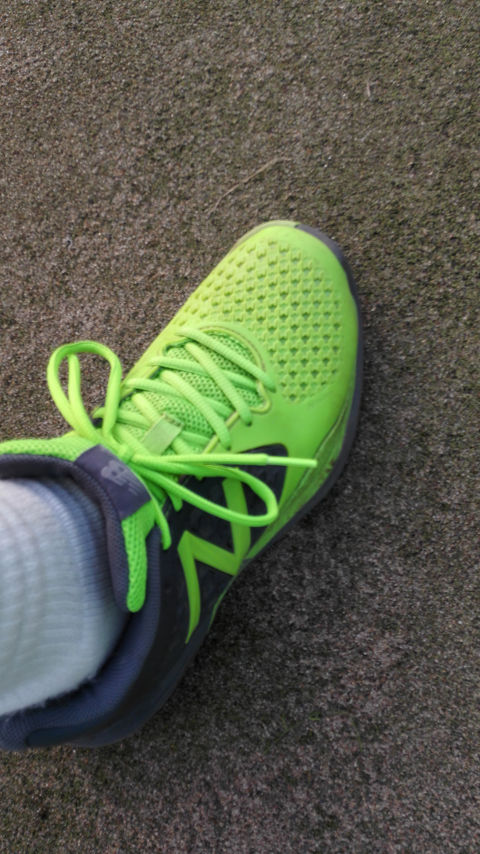
週末にテニスする度に体のあちこちが痛くなる今年のクレーは、ニューバランスのMC906を履いています。
昨年も長時間のテニスに対し足の負担を減らしたいという思惑で旧MC906を買っていてまだまだ全然消耗していなかったけど、新社会人という事で思い切って新しい方のMC906を買ったのが4月。
同じ名前なのに見た目が大きく変わったMC906、旧の方は軽くて疲れにくかった点は満足だったけどちょっと柔らか過ぎるのがイマイチでした。そういうタイプのシューズだけど。
そんな不満を三月にも書いていましたが、それに対し今のMC906は軽量タイプと言われながらもそこそこ厚みがあって安心感がある。
物足りないと感じていた要素が補強されてバランス良くなった気がします。
それに加え今年の夏はカーフタイツと極厚ソックスも投入して負担軽減に挑み、何とか大きな怪我無く乗り越える事ができました(勝敗は置いといて)
ちなみにハードではプリンスのツアープロZを、これも昨年に購入して使っているのですが、最近はほぼオムニでしかテニスをしていないので全然履いていません。
ツアープロZも今までのトップモデルより締め付けが優しいのにしっかりフィットして負担が少ない&強度もしっかりあって、凄く良いシューズだと思います。
正直MC906より気に入ってます。出番無いけど。
ウェアをニューバランスで統一するか、進化したバージョンⅡに手を出してみるか、両メーカーがほぼ同時に良いシューズへモデルチェンジをしてしまったので悩みどころですが、ハードコートでプレーする機会が来ないのでオールコート用のシューズの買い替えはまだ当分先になりそうです。












Реставрация Москва Ремонт мебели
폰테크
сброс пароля iphone замена шлейфа громкости iphone
краби отели рейтинг краби еда
snipping tool alternative The Best Screenshot Utility for Windows 10 & 11 If taking screenshots is part of your everyday work the built-in Windows Snipping Tool quickly starts to feel limiting. Extra steps no cloud upload no instant links and slow interaction make it inefficient for modern use. A modern screenshot tool should be invisible fast and optimized around a single flow: capture upload share. This lightweight screenshot tool for Windows 10 and 11 is built exactly for that. Press PrtScn select a region on the screen release and the screenshot is instantly uploaded. The sharing link is placed in your clipboard automatically. No save dialogs no browsing folders no manual uploading. Area capture works precisely and predictably. A clean crosshair selector allows pixel-accurate selection allowing easy capture of interface elements code fragments charts or partial screens — faster and more dependable than the default Snipping Tool. Capturing the entire screen is just as easy. Press Shift PrtScn to instantly capture the full desktop. The result is a full-resolution screenshot ideal for documentation presentations or bug reporting without delays or popups interrupting the workflow. The key advantage is instant cloud upload. Every screenshot is uploaded automatically and the sharing link available within milliseconds. You can paste it directly into messengers emails or support tickets without touching the file system or third-party image hosts. The application runs quietly in the system tray and remains out of your workflow. Memory consumption remains under 50MB of RAM startup is instant with an installer that is only 2MB. Compared to heavier alternatives like Greenshot Lightshot or ShareX the performance and responsiveness difference is obvious immediately. Privacy is handled responsibly. No ads no analytics no tracking and no background data collection. Screenshots may contain sensitive information and this tool treats them accordingly — and no unnecessary processes running behind the scenes. Hotkeys are fully customizable. You can assign PrtScn CtrlShiftS or any key combination you prefer and configure image quality or behavior without heavy settings panels or cluttered menus. The built-in Windows Snipping Tool works but it stops at capture. It lacks cloud integration instant sharing and speed optimization. This tool serves as a replacement by focusing on what matters most: capturing data and sharing it without delay. If screenshots are part of your daily work in development support remote work or documentation — speed and simplicity are not optional. A modern screenshot tool should feel like a system feature not an application.