

またやってしまいました。
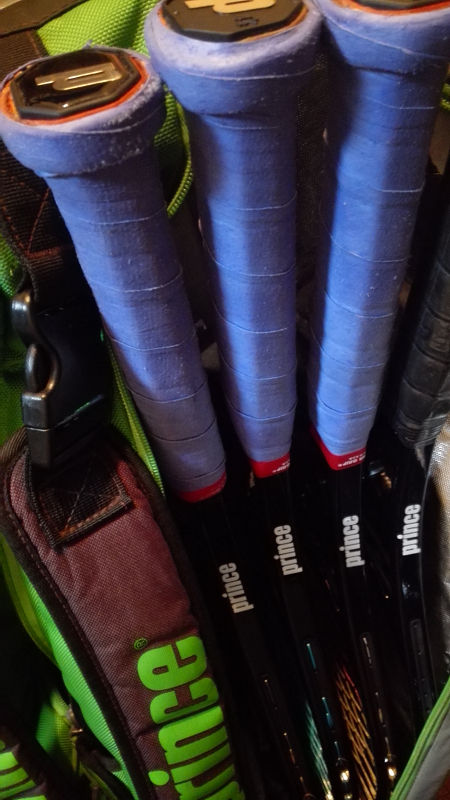
この前の試合は1本しか使わなかったのに、4本目到着である。
流石に4本目は買い過ぎだろと思ったものの、後輩の「独占しちまえば使用契約も当然」なる謎の提案を受けて、ついつい・・・
9本入りのバッグだけど、4本同時は持ち歩かないだろうな・・・。

他にもナチュラルガットも届きました。(HDアスタポリは別口で緊急調達)
いつも買ってる店でタフガットが品切れでどうしようかと悩んだ末にクラシックガットとプライムガットを購入。
せっかくの機会なのでパシフィック製の上下のランクを試してしまおうじゃないですか・・・!
その他のシルバーセレクトは太いのしか無いらしく、オレンジブルは個人的に色が主張し過ぎていてイマイチ、ブルガットはいくらなんでも常用はしないと思うので回避。
自分的に調子の良いHDアスタポリとハイブリッドで組ませてどこまで進化するか試したい・・・ところですが、本戦控えている中でそれはいくらなんでも変え過ぎですね。
・・・と言いながら、次の土日には張っちゃっているかもしれません(笑)












폰테크
Experience thrilling gameplay and rewarding moments with [url=https://deepai.org/profile/777bet/]777bet online casino[/url], where each spin brings fresh excitement and new possibilities to win.
As a renowned online betting site, 777bet provides numerous betting markets and an intuitive user experience.
screen capture software
Best Screenshot Tool for Windows 10 & 11
If screenshots are a regular part of your workflow, the standard Windows Snipping Tool soon shows its limitations. Extra steps, no cloud upload, no instant links, and slow interaction make it impractical for modern workflows. A modern screenshot tool should be invisible, fast, and optimized around a single flow: capture > upload > share.
This minimal screenshot tool for Windows 10 & 11 is designed precisely for this purpose. Press PrtScn, select any region of the screen, release — and the screenshot is already uploaded. A shareable link is automatically copied to the clipboard. No save dialogs, no browsing folders, no manual uploading.
Region capture is precise and predictable. A clear crosshair selector provides pixel-accurate selection, making it easy to capture UI elements, code fragments, charts, or partial screens — faster and more reliable than the standard Snipping Tool.
Capturing the entire screen is just as easy. Press Shift + PrtScn to instantly capture the full desktop. The result is a full-resolution screenshot ideal for documentation, presentations, or bug reporting, without delays or popups breaking the workflow.
The key advantage is instant cloud upload. Each screenshot is uploaded automatically, and the link is available in milliseconds. You can paste it directly into messengers, emails, or support tickets without interacting with the file system or external image hosting services.
The application runs silently in the system tray and remains out of your workflow. Memory usage stays under 50MB RAM, startup is instant, and the installer size is just 2MB. Compared with heavier tools such as Greenshot, Lightshot, and ShareX, the difference in speed and responsiveness is immediately noticeable.
Privacy is handled responsibly. No advertising, no analytics, no tracking, and no background data collection. Screenshots often contain sensitive information, and the application treats them with proper care — and no unnecessary processes running behind the scenes.
Keyboard shortcuts are fully customizable. You can assign PrtScn, Ctrl+Shift+S, or any shortcut you want, and adjust image quality or behavior without bloated settings panels or cluttered menus.
Windows Snipping Tool functions, but it stops after capture. It offers no cloud workflow, no instant sharing, and no speed optimization. This tool replaces it by focusing on what actually matters: capturing information and sharing it instantly.
If you capture screenshots daily for development, support, remote work, or documentation — speed and simplicity are essential. A modern screenshot tool should feel like a native system feature, not a standalone app.
screen capture software The Best Screenshot Utility for Windows 10 & 11 If screenshots are a regular part of your workflow the default Windows Snipping Tool quickly becomes a limitation. Additional steps lack of cloud uploads no instant links and slow interaction make it inefficient for modern use. A proper screenshot tool must stay out of the way work fast and focus on a single process: capture upload and share. This lightweight screenshot tool for Windows 10 and 11 is built specifically around this idea. Press PrtScn select any region of the screen release — and the screenshot is already uploaded. The shareable link is copied to the clipboard automatically. No save prompts no directories no manual file handling. Region capture is accurate and consistent. A clear crosshair selector provides pixel-accurate selection which makes capturing UI elements code snippets charts or partial screens effortless — faster and more reliable than the standard Snipping Tool. Capturing the entire screen is just as easy. Use Shift PrtScn to capture the entire desktop instantly. The result is a full-resolution image perfect for documentation presentations and bug reports without delays or popups interrupting the workflow. The key advantage is instant cloud upload. Each screenshot is uploaded automatically with the link ready in milliseconds. You can paste it directly into messengers emails or support tickets without dealing with files or third-party image hosts. The application runs silently in the system tray and is built to stay unobtrusive. RAM usage stays below 50MB startup is immediate and the installer is only 2MB. Compared to heavier alternatives like Greenshot Lightshot or ShareX the improvement in speed and responsiveness is instantly noticeable. Privacy is handled correctly. There are no ads no analytics no tracking and no background data collection. Screenshots frequently include sensitive data and this tool handles them appropriately — and no unnecessary processes running behind the scenes. Hotkeys are fully customizable. You can assign PrtScn CtrlShiftS or any shortcut you want and fine-tune image quality and behavior without oversized settings or cluttered interfaces. Windows Snipping Tool functions but it stops after capture. It offers no cloud workflow no instant sharing and no speed optimization. This tool replaces it by focusing on what actually matters: capturing information and sharing it immediately. If screenshots are part of your daily work in development support remote work or documentation — speed and simplicity are mandatory. A modern screenshot tool should feel like a native system feature not a standalone app.
fc777 offers the best slot machines and generous bonuses for all players. This adoption has led to significant improvements in workflow and results.