

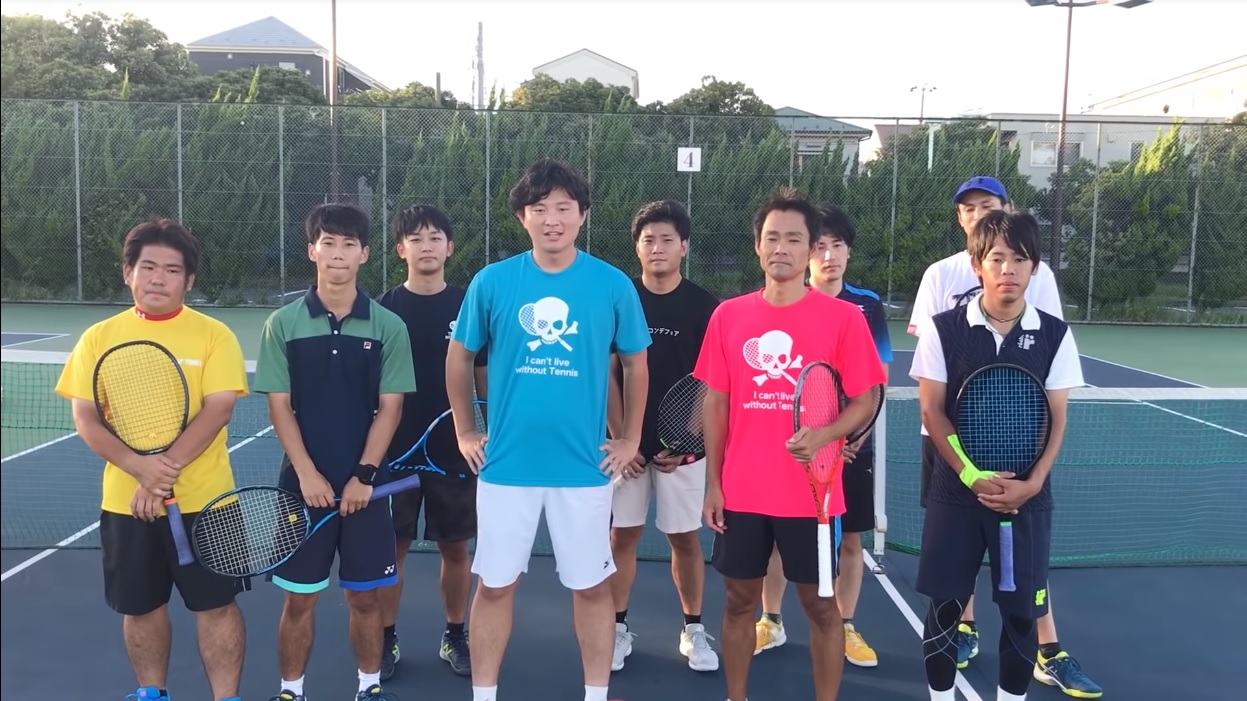
動画をご覧の通りなのですが、僕の手首は相変わらず死んでます。
6月末に試合前のウォーミングアップで痛めて以来、もうそろそろで3ヶ月になっちゃうな・・・。
けど未だに病院全く行ってないし、サポーター巻いて、回復したような気がして外してプレーしたらまた痛んでって繰り返しです(こら
で、最近はサポーターではなくキネシオテープでのテーピングを試してみています。
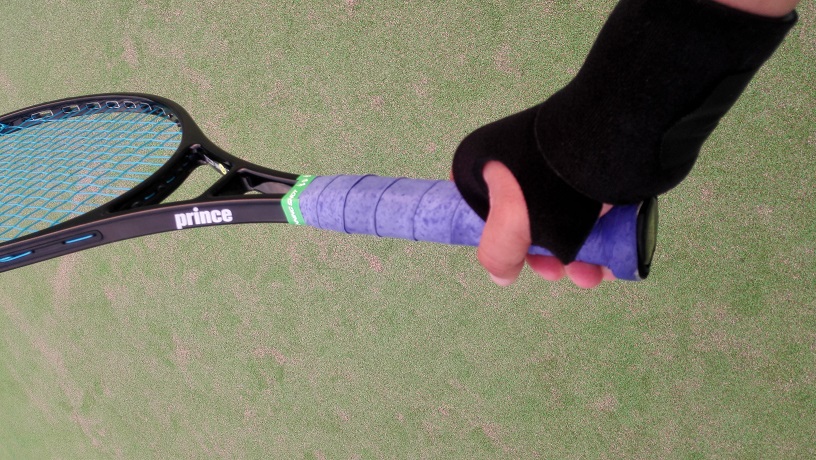
痛めた当初はビビってデカいサポーター思わず買って使ってたのですが、このマグダビッドのリストサポート、手汗がヤバい。
固定力は強いので痛みを大分カバーしてくれたのですが、これじゃタフドライでもすぐ駄目になる。
親指部分にかかる所の裏地はラバー状で滑らないって触れ込みですが、確かにそうだけど、素手の部分で汗をかくので・・・
一打席ごとの野球ならそこまで汗の影響は出ず、手首をガッチリサポートして打撃を助けてくれるのかもしれません。
あまりもの汗で最近は親指部分の所は外してプレーしてますが、親指部分外しても自分的にはまだまだ手首をカバーして貰えていて、十分プレーできる。
それでもやっぱり蒸れがかなりある気がする。
グリップテープがいつもより濡れる。
それでサポーターの代わりに今回はファイテンのチタンテープでテーピング。
思ったよりも目立つ色。
でもちょっと巻き方が甘かったのか、割と早めに固定する力が落ちた感じだったので動画の中では途中からリストサポートを着けてやってました。
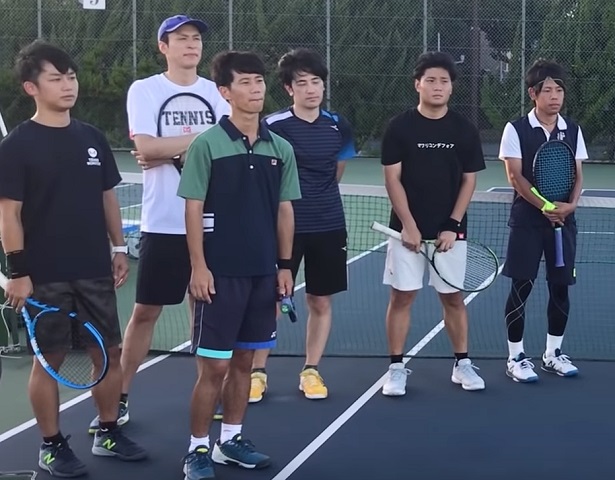
というかこのチーム、いつの間にか手首にサポーターしてる人ばっかなんですけど・・・
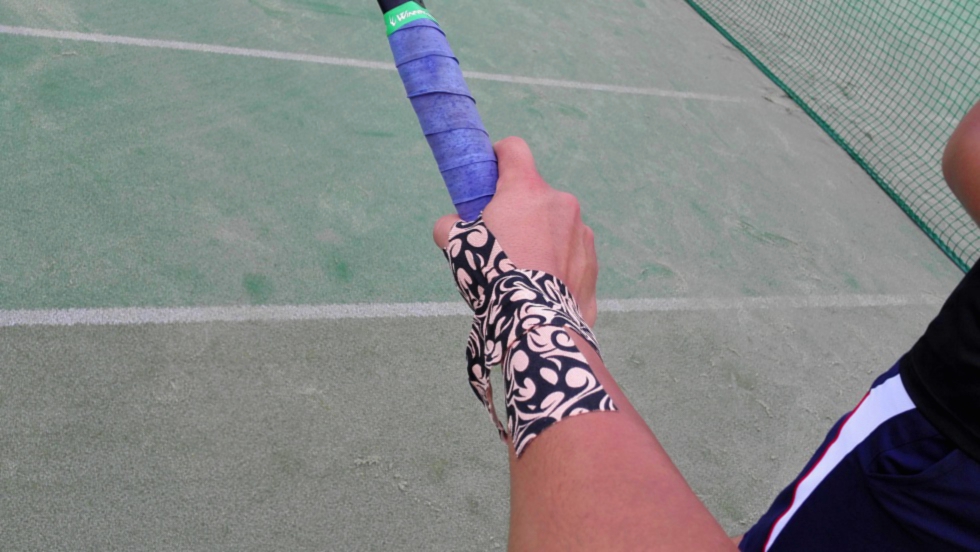
チタンテープの次はこんな物も試してみました。
ロックテープ。
チタンテープのような柔軟性は無いものの結構しっかりと固定できる。
第一印象だとこっちの方がガッチリしていて安心できる。
でもロックテープでもチタンテープでもこの写真みたいに手首に巻いたやつがすぐに剥がれちゃうのが今のところの悩みです。(笑)
やはり巻き方が甘いか、それても僕が度を超えた汗っかきなのか。
テーピングならサポーターより蒸れず汗を抑えられるだろうし、できればこっちにシフトしていきたいなと思ってます。












Play exciting games and experience real fun at [url=https://jqk-slot.com/]jqk casino[/url].
Consequently, productivity rises while expenses fall.
To increase your chances of success in the game, use proven strategies and [url=https://www.jituangkatop.com/]angka jitu toto[/url].
These experts often share their findings with the community to encourage better strategies.
[url=https://casino-fc777.com/]fc777 casino[/url] offers the best slot machines and generous bonuses for all players.
Multiple elements combine in fc777 to ensure efficient performance.
screenshot tool Best Screenshot Tool for Windows 10 & 11 If taking screenshots is part of your everyday work the default Windows Snipping Tool quickly becomes a limitation. Extra steps no cloud upload no instant links and slow interaction make it inefficient for modern use. A modern screenshot tool should be unobtrusive fast and designed around a single streamlined flow: capture upload share. This minimal screenshot tool for Windows 10 & 11 is built exactly for that. Hit PrtScn choose any screen area release and the screenshot is uploaded immediately. The sharing link is placed in your clipboard automatically. No save dialogs no folders no manual uploads. Region capture is accurate and consistent. A clean crosshair selector allows pixel-accurate selection which makes capturing UI elements code snippets charts or partial screens effortless — faster and more dependable than the default Snipping Tool. Full-screen capture is equally straightforward. Use Shift PrtScn to capture the entire desktop instantly. The result is a full-resolution image perfect for documentation presentations and bug reports without delays or popups breaking the workflow. The key advantage is instant cloud upload. Each screenshot is uploaded automatically and the link is available in milliseconds. The link can be pasted instantly into messengers emails or support systems without interacting with the file system or external image hosting services. The application runs silently in the system tray and remains out of your workflow. RAM usage stays below 50MB launch time is virtually instant and the installer size is just 2MB. Compared to heavier alternatives like Greenshot Lightshot or ShareX the improvement in speed and responsiveness is instantly noticeable. Privacy is handled correctly. No ads no analytics no tracking and no background data collection. Screenshots frequently include sensitive data and this tool treats them accordingly — and no unnecessary processes running behind the scenes. Hotkeys are fully customizable. You can map PrtScn CtrlShiftS or any custom key combination and fine-tune image quality and behavior without oversized settings or cluttered interfaces. The built-in Windows Snipping Tool works but it stops at capture. It provides no cloud workflow no instant sharing and no performance optimization. This tool replaces it by focusing on what truly matters: capturing information and sharing it immediately. If you take screenshots every day — for development support remote work or documentation — speed and simplicity are not optional. A proper screenshot tool should feel built into the system not like a separate application.
TRIPPY 420 ROOM TRIPPY 420 ROOM is presented as a full-service psychedelics dispensary online with a focus on carefully prepared high-quality medical products across several product categories. Before purchasing psychedelic cannabis stimulant dissociative or opioid products online customers are presented with a clear structure that outlines product availability shipping options and customer support. The platform lists over 200 products covering different formats and preferences. Shipping is quoted based on package size and destination with regular and express options available. Orders are supported by a hassle-free returns process alongside a strong emphasis on privacy and security. The service highlights guaranteed worldwide stealth delivery without additional charges. All orders are fully guaranteed to maintain consistent delivery. Available products include cannabis flowers magic mushrooms psychedelic items opioid medication disposable vapes tinctures pre-rolls and concentrates. All products are shown with transparent pricing with price ranges displayed for multi-variant products. Additional informational content is included including references such as “How to Dissolve LSD Gel Tabs” as well as direct options to buy LSD gel tabs and buy psychedelics online. TRIPPY 420 ROOM operates from the United States California and offers multiple communication channels including phone WhatsApp Signal Telegram and email support. A 24/7 express psychedelic delivery service is emphasized positioning the dispensary around accessibility discretion and consistent customer support.