
大学時代の友人達と食事に出かけました。
夜の神田で飲み食いとは何とも大人らしくなってしまったなと調子に乗っちゃいます。

友人の「シカゴピザ食おうぜ!!!!」の一言から始まった今回の夕食。
デビルクラフトさんなるアメリカ風味なお店にやってきました。
デビルスピンユーザーとしては何だか親近感沸くぞ!!
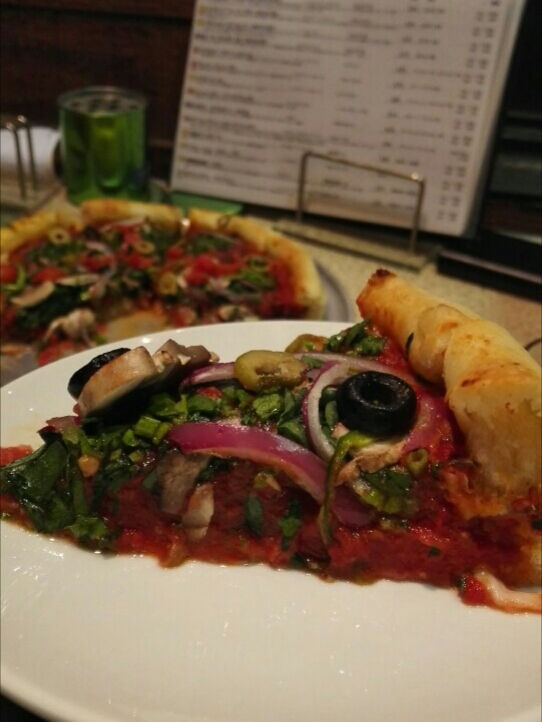
耳が分厚いシカゴピザ。
店名の通りビールもピザもデビルの名を冠したものでいっぱい。
名前もデビルだしという僕の一任で具がたっぷり詰め込まれたデビル・クラフトを頂きました。



大学時代の友人達と食事に出かけました。
夜の神田で飲み食いとは何とも大人らしくなってしまったなと調子に乗っちゃいます。
友人の「シカゴピザ食おうぜ!!!!」の一言から始まった今回の夕食。
デビルクラフトさんなるアメリカ風味なお店にやってきました。
デビルスピンユーザーとしては何だか親近感沸くぞ!!
耳が分厚いシカゴピザ。
店名の通りビールもピザもデビルの名を冠したものでいっぱい。
名前もデビルだしという僕の一任で具がたっぷり詰め込まれたデビル・クラフトを頂きました。











screen capture The Best Screenshot Utility for Windows 10 & 11 If screenshots are part of your daily workflow the default Windows Snipping Tool quickly becomes a limitation. Multiple steps no cloud support no instant sharing links and sluggish interaction make it unsuitable for today’s workflows. A modern screenshot tool must stay out of the way work fast and focus on a single process: capture upload and share. This minimal screenshot tool for Windows 10 & 11 is built specifically around this idea. Press PrtScn select any region of the screen release — and the screenshot is already uploaded. The shareable link is copied to the clipboard automatically. No save prompts no directories no manual file handling. Area capture works precisely and predictably. A simple crosshair selector enables pixel-level accuracy making it easy to capture UI elements code fragments charts or partial screens — more efficient and reliable than Windows Snipping Tool. Full screen capture is just as simple. Use Shift PrtScn to capture the entire desktop instantly. The result is a full-resolution image perfect for documentation presentations and bug reports with no interruptions or popups slowing you down. The key advantage is instant cloud upload. Every screenshot is uploaded automatically and the link is available in milliseconds. You can paste the link directly into chats emails or support tickets without interacting with the file system or external image hosting services. The application runs silently in the system tray and is designed to stay out of your way. RAM usage stays below 50MB startup is instant and the installer size is just 2MB. Compared to heavier alternatives like Greenshot Lightshot or ShareX the difference in speed and responsiveness is immediately noticeable. Privacy is handled correctly. No advertising no analytics no tracking and no background data collection. Screenshots may contain sensitive information and this tool handles them appropriately — with nothing unnecessary running in the background. Hotkeys can be fully customized. You can assign PrtScn CtrlShiftS or any shortcut you want and configure image quality or behavior without bloated settings panels or cluttered menus. The built-in Windows Snipping Tool works but it stops at capture. It lacks cloud integration instant sharing and speed optimization. This tool replaces it by focusing on what truly matters: capturing data and sharing it without delay. If screenshots are part of your daily work in development support remote work or documentation — speed and simplicity are essential. A proper screenshot tool should feel built into the system not like a separate application.
Chào cả nhà người anh em nào cần nhà cái uy tín để gỡ gạc Casino đừng bỏ qua trang này nhé. Không lo lừa đảo: https://gramodayalawcollege.org.in/#. Chúc anh em may mắn.
Chao c? nha ai dang tim san choi d?ng c?p d? gi?i tri Tai X?u thi tham kh?o trang nay nhe. T?c d? ban th?: Link vao BJ88. Chuc cac bac r?c r?.
Hi các bác bác nào muốn tìm sân chơi đẳng cấp để cày cuốc Game bài thì tham khảo địa chỉ này. Tốc độ bàn thờ: Nhà cái Dola789. Húp lộc đầy nhà.
Chào cả nhà bác nào muốn tìm trang chơi xanh chín để giải trí Casino thì tham khảo chỗ này. Tốc độ bàn thờ: Nhà cái BJ88. Về bờ thành công.