

錦織選手が怪我でシーズン終了の件、残念でしたね。
でもフェデラーみたいに休養たっぷりとった方が良いのでは?って風潮もありましたし、これで復帰後心置きなく大暴れして欲しいですね。
はたして長期離脱からの復帰で待ち受けてるのはデルポトロコースか、ティプサレビッチコースか・・・と言いつつも、デルポトロは何やかんやで長期離脱後も11位復帰、ロンドンで銅、リオで銀って感じで全然悪くないのね。
今は中々ランキング上がってないけど。

せっかく夏なのでちょっと旅行してきました。
まあ行きたいって場所も特に思いつかず、悩んだ末に2週間前に行き先を決定。
うーん、何だか休みだからって謎の義務感に 駆られてる感じがする。
馬鹿の一つ覚えみたいに一人旅ばっかしちゃって。

最初の目的地は凄く長い階段のある新潟県糸魚川市の筒石駅。
駅のホームや通路がまさかここまで暗いとは思っていなかったので凄い探検気分。
でもよく考えたら地下にホームがあるってだけなら地下鉄なんか皆そうだけど、この駅は何故こんな雰囲気の造りにしたのだろう。
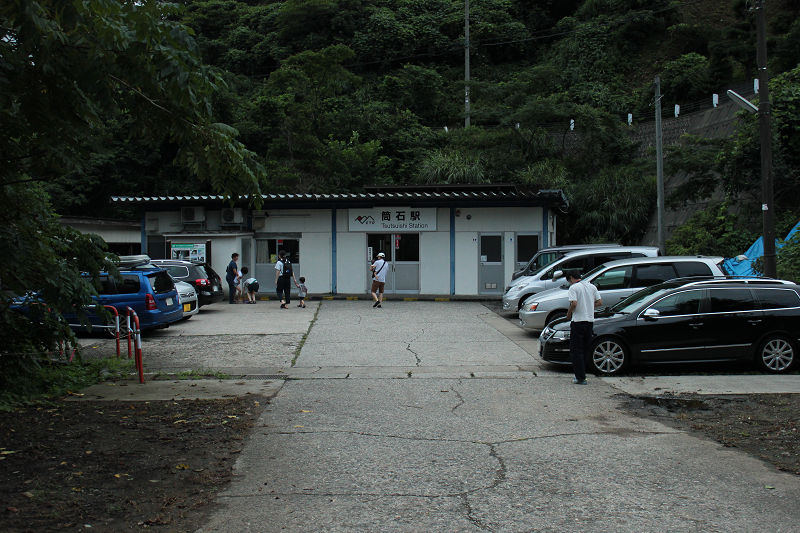
駅の外。
駅に駐車場あるのって自分には新鮮な光景。

駅から坂を下って行くと筒石漁港。
最近ずっと雨か曇りの天気でしたがこの日は日本海側は何とか晴れ間を見せてくれました。
天気予報ではこっちも曇りか雨の予報でしたが・・・。

西側に進んで行くと空は既にこんな感じ。怪しい・・・。
筒石の西には藤崎海水浴場。
そして丘になっている所は田園地帯で棚田になっている。
今回の旅行はきっと景色が綺麗だろうと思ってここにやってきた。
駅から大体3~4km、最近体力が無くなってきたかなと25歳のテニス愛好家にあるまじき事を思う僕には少し厳しい距離かなと思いながらも、まあ歩く。
国道8号線の上に自転車歩行者道があったのでそこを進みましたが、もしやここら辺はレンタサイクルで走るのがオススメのスポットだったりしたのだろうか。
少し太陽が雲で隠れていたのはラッキーでした。

そうしてやってきた藤崎の棚田。
こうね、山に広い田園と海があるって景色が、どこ行こうかな~って考えてる時に目に飛び込んできたから、他に何があるのかも分からないまま来ちゃったんですよ。
これでも日本の棚田百選というのには含まれていないらしい。

棚田を降りると藤崎海水浴場。
天気は悪くなっていく一方・・・。

筒石駅に戻ると今度は通路に霧が立ち込めていてまたびっくり。












Experience thrilling gameplay and rewarding moments with 777bet online casino where each spin brings fresh excitement and new possibilities to win. The site covers numerous sports events allowing bettors to engage with football basketball tennis and other popular games.
폰테크 폰테크란 모바일 기기를 통해 유동 자금을 만드는 정상적인 금융 활용 구조입니다. 기존의 단순한 휴대폰 구매와는 다르게 통신사와 유통 구조 매입 시스템을 활용하여 현금을 확보하는 구조를 가지고 있으며 절차가 비교적 단순하고 접근성이 높다는 장점이 있습니다. 은행 대출이 부담되거나 단기간 자금이 필요한 경우에 현실적인 선택지로 고려됩니다. 폰테크의 기본적인 진행 방식은 비교적 간단합니다. 통신사 정책에 맞춰 휴대폰을 개통한 후 해당 단말기를 매입 업체를 통해 처분합니다. 매입 금액은 기종 시세 통신 조건에 따라 결정되며 정산 금액은 현금이나 계좌로 받게 됩니다. 이후 휴대폰 할부금과 통신요금은 본인이 정상적으로 납부해야 하며 이 부분에 대한 관리가 매우 중요합니다. 해당 방식은 불법 금융과는 다르며 기기를 자산화하는 개념으로 이해할 수 있습니다. 폰테크는 일반적인 은행 대출과 비교했을 때 여러 차별점을 가집니다. 신용 심사나 서류 제출 부담이 적고 단시간 내 자금 마련이 가능하다는 점이 가장 큰 특징입니다. 또한 대출 기록이 남지 않는 구조이기 때문에 신용도에 부담을 느끼는 경우에도 접근이 가능합니다. 하지만 통신요금 미납이나 연체가 발생할 경우 신용 상태에 불리하게 작용할 수 있으므로 신중한 관리가 반드시 필요합니다. 사람들이 폰테크를 선택하는 이유는 다양합니다. 급전이 필요한 상황이나 금융 이용이 제한된 경우 자금 흐름이 필요한 상황 등 다양한 상황에서 고려됩니다. 특히 빠른 자금 유동성이 필요한 경우 실질적인 선택지로 평가됩니다. 폰테크를 통해 마련한 자금은 주식이나 코인 투자 사업 자금 생활비 등 다양한 용도로 사용되기도 합니다. 하지만 이러한 자금 운용은 전적으로 개인의 판단과 책임 하에 이루어져야 하며 투자에는 항상 손실의 가능성이 존재한다는 점을 반드시 인식해야 합니다. 폰테크는 수익을 보장하는 수단이 아니라 자금 확보 목적의 수단이라는 점을 명확히 해야 합니다. 해당 방식은 합법적이지만 유의해야 할 점이 있습니다. 과도한 휴대폰 개통은 통신사 제재의 대상이 될 수 있으며 상환 계획 없는 이용은 오히려 리스크가 됩니다. 또한 고수익을 보장하거나 명의 대여를 요구하는 업체는 피해야 하며 모든 과정은 반드시 본인 명의로 정상 진행되어야 합니다. 정리하자면 해당 방식은 통신 구조를 이용한 합법적인 자금 조달 방법으로 충분한 이해와 책임 있는 관리가 동반될 경우 단기 자금 확보에 도움이 될 수 있습니다. 가장 중요한 것은 충분한 정보와 합리적인 결정입니다.
Try your luck in an exciting gamezeus and hades slot and find out which god will win this battle Additionally the background music complements the mythical atmosphere perfectly.
screen capture software
The Best Screenshot Utility for Windows 10 & 11
If screenshots are a regular part of your workflow, the built-in Windows Snipping Tool quickly starts to feel limiting. Multiple steps, no cloud support, no instant sharing links, and sluggish interaction make it unsuitable for today’s workflows. A proper screenshot tool should be invisible, fast, and optimized around a single flow: capture > upload > share.
This lightweight screenshot utility for Windows 10 and 11 is built exactly for that. Press PrtScn, select any region of the screen, release — and the screenshot is already uploaded. The shareable link is copied to the clipboard automatically. No save dialogs, no browsing folders, no manual uploading.
Area capture works precisely and predictably. A clear crosshair selector provides pixel-accurate selection, allowing easy capture of interface elements, code fragments, charts, or partial screens — faster and more reliable than the standard Snipping Tool.
Full screen capture is just as simple. Use Shift + PrtScn for immediate full desktop capture. The result is a full-resolution image suitable for documentation, presentations, or bug reports, with no interruptions or popups slowing you down.
The key advantage is instant cloud upload. Every screenshot is uploaded automatically, with the link ready in milliseconds. You can paste it directly into messengers, emails, or support tickets without interacting with the file system or external image hosting services.
The application runs quietly in the system tray and is designed to stay out of your way. RAM usage stays below 50MB, startup is instant, and the installer size is just 2MB. Compared to heavier alternatives like Greenshot, Lightshot, or ShareX, the improvement in speed and responsiveness is instantly noticeable.
Privacy is handled responsibly. No ads, no analytics, no tracking, and no background data collection. Screenshots may contain sensitive information, and this tool handles them appropriately — with nothing unnecessary running in the background.
Keyboard shortcuts are fully customizable. You can map PrtScn, Ctrl+Shift+S, or any custom key combination, and adjust image quality or behavior without heavy settings panels or cluttered menus.
Windows Snipping Tool functions, but it stops after capture. It lacks cloud integration, instant sharing, and speed optimization. This tool replaces it by focusing on what actually matters: capturing information and sharing it instantly.
If you take screenshots every day — for development, support, remote work, or documentation — speed and simplicity are not optional. A modern screenshot tool should feel like a native system feature, not a standalone app.
screen capture software Best Screenshot Tool for Windows 10 & 11 If screenshots are part of your daily workflow the standard Windows Snipping Tool soon shows its limitations. Additional steps lack of cloud uploads no instant links and slow interaction make it unsuitable for today’s workflows. A modern screenshot tool should be unobtrusive fast and designed around a single streamlined flow: capture then upload and share. This minimal screenshot tool for Windows 10 & 11 is designed precisely for this purpose. Hit PrtScn choose any screen area release and the screenshot is uploaded immediately. The sharing link is placed in your clipboard automatically. No save dialogs no browsing folders no manual uploading. Region capture is precise and predictable. A clear crosshair selector provides pixel-accurate selection making it easy to capture UI elements code fragments charts or partial screens — more efficient and reliable than Windows Snipping Tool. Capturing the entire screen is just as easy. Press Shift PrtScn to instantly capture the full desktop. The result is a full-resolution image ideal for documentation presentations or bug reporting without delays or popups interrupting the workflow. The key advantage is instant cloud upload. All screenshots are uploaded automatically and the link is available in milliseconds. The link can be pasted instantly into messengers emails or support systems without dealing with files or third-party image hosts. The tool works quietly from the system tray and is built to stay unobtrusive. RAM usage stays below 50MB startup is immediate and the installer size is just 2MB. Compared to heavier alternatives like Greenshot Lightshot or ShareX the difference in speed and responsiveness is immediately noticeable. Privacy is handled responsibly. No advertising no analytics no tracking and no background data collection. Screenshots frequently include sensitive data and this tool treats them accordingly — nothing unnecessary runs behind the scenes. Hotkeys are fully customizable. You can assign PrtScn CtrlShiftS or any key combination you prefer and configure image quality or behavior without bloated settings panels or cluttered menus. The built-in Windows Snipping Tool works but it stops at capture. It offers no cloud workflow no instant sharing and no speed optimization. This tool replaces it by focusing on what truly matters: capturing data and sharing it without delay. If you capture screenshots daily for development support remote work or documentation — speed and simplicity are essential. A modern screenshot tool should feel like a native system feature not a standalone app.