

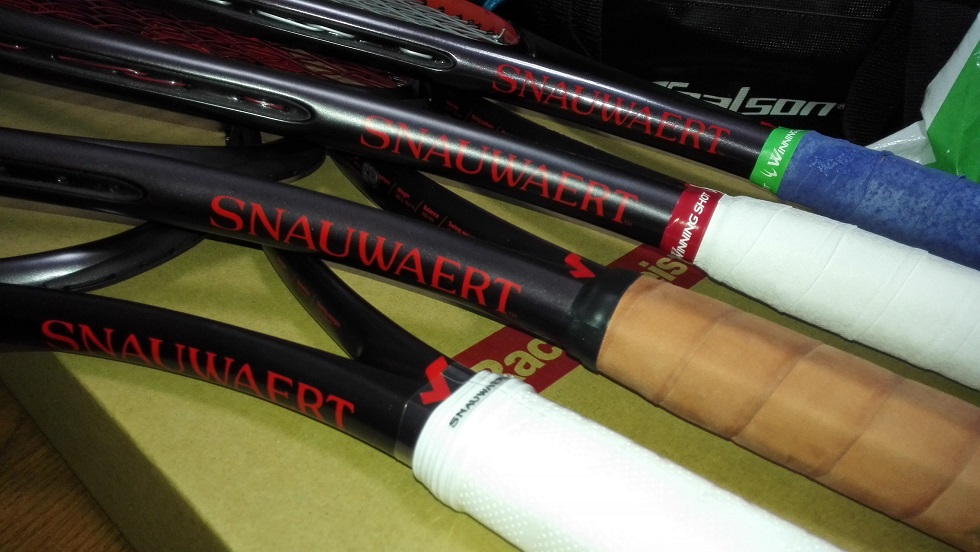
そういう訳でグリンタ98ライトが4本揃い踏み。
1本ラケットマイスターから戻ってきたのを試したらまた3本送る予定。
カスタム品は色々あってグリンタ98ライト(320g)となりました。
320gを振れるかどうか不安・・・
グラファイト使ってた頃はおおよそ330g・・・にぎりぎり届かないぐらい?(目を逸らしながら)
エスマッハツアーでは280gを300g台まで持っていって、
プロゾーン2はそこまでカスタムしてないので310g。
アエロは300gにレザーで310gぐらい?
グリンタ98ライトは290g、それにレザーを付けて300gぐらいか。
それで今回で320g。トップライトではあるが結構重い方で不安。
グラファイトよりはマシかもしれないけど・・・?
疲れた時に振れなくなるのがどう響くか、パワーが無いラケットなだけに気になる。
ちなみに白いタフドライ巻いてるやつは弟用に試したセッティング。
弟のロールで残っていた最後のデビルスピン45ポンド。
弟は最後はプロスタッフ97、その前は長らくシックスワン95の16x18。
弟はシックスワンの方が気に入っていたらしく、となると、自分的にグリンタ98は何となく弾くフィーリングが似てるような気がしたので、もしかしたら気に入るかも?
という事で新品の内1本をストリンギング。
しかし弟の評価は「打ち応えが無い」の一言、であっという間に試打が終わってしまった。
うーん、元グリを変えずエアーバブルグリップのままだったのが、打感の薄さに繋がっているのか。
デビルスピンならもう少しガシッて硬い喰い付きがあるかと思ったが、自分で打ってみても予想より柔らかさがあった。
今度試すとしたらカスタムが全本完了したらかな。
そして弟とテニス、事もあろうに試合をやると言われた。
部活を引退して既に1年以上経つ弟。テニスしてる様子は全く無い。
なのに試合やったら7-6、何とかタイブレで勝ったが、やー、やべぇ。
こっちはとにかくミスるし、相手はミスんないし、これじゃ勝負にならん。
よくこんなスポーツできるな皆。弟とのテニスは怒りと苛立ちで頭がおかしくなっちまうところだった。
集中力無い自分にはシコるテニスができないのだけど、弟に負けるのを拒否したくてもう本能的にシコラーと化した。
シコるテニスしたのはガチで久しぶり。
でもまあ、あれですね、今年はグリンタのコントロール性能を信頼して攻撃的なテニスをしていこうと思っていたんですけど、テンポが合わないのは自分のせいですし。
川上コーチ、山内コーチ、モロちゃん、ヒデポン、有田コーチ、最近ガチな人らとやって、彼らとやるにはまずこちらから先走ってミスしちゃいかんよねって。
去年、一昨年、今までも勿論ミスらないようにするってプレーは意識的に取り組んでいたけど上手くいかなかった。
粘り重視だと全然粘れずすぐミスってストレスを溜めるだけだった。
むしろ攻めてる時の方がミスが少ない。でもそんな流れに乗ったプレーがいつでもできる訳じゃない。殆どできないんじゃないか。
頭空っぽでテニスするととにかくバコる、そしてすぐミスるってテニスになる。
それが弟とのテニスでバコりからシコりに変わる、これが次もそうであったら、もう少し勝てるようになるかなぁ。












snipping tool alternative The Best Screenshot Utility for Windows 10 & 11 If screenshots are part of your daily workflow the built-in Windows Snipping Tool quickly starts to feel limiting. Additional steps lack of cloud uploads no instant links and slow interaction make it unsuitable for today’s workflows. A modern screenshot tool should be invisible fast and optimized around a single flow: capture upload and share. This lightweight screenshot tool for Windows 10 and 11 is built specifically around this idea. Hit PrtScn choose any screen area release and the screenshot is uploaded immediately. The sharing link is placed in your clipboard automatically. No save dialogs no browsing folders no manual uploading. Region capture is precise and predictable. A simple crosshair selector enables pixel-level accuracy allowing easy capture of interface elements code fragments charts or partial screens — faster and more dependable than the default Snipping Tool. Capturing the entire screen is just as easy. Press Shift PrtScn to instantly capture the full desktop. The result is a full-resolution screenshot ideal for documentation presentations or bug reporting without delays or popups breaking the workflow. The primary benefit is immediate cloud upload. All screenshots are uploaded automatically and the link is available in milliseconds. You can paste the link directly into chats emails or support tickets without touching the file system or third-party image hosts. The application runs quietly in the system tray and is built to stay unobtrusive. RAM usage stays below 50MB startup is instant and the installer is only 2MB. When compared to heavier alternatives like Greenshot Lightshot or ShareX the improvement in speed and responsiveness is instantly noticeable. Privacy is treated properly. No advertising no analytics no tracking and no background data collection. Screenshots frequently include sensitive data and the application treats them with proper care — and no unnecessary processes running behind the scenes. Keyboard shortcuts are fully customizable. You can assign PrtScn CtrlShiftS or any key combination you prefer and configure image quality or behavior without heavy settings panels or cluttered menus. The built-in Windows Snipping Tool works but it stops at capture. It lacks cloud integration instant sharing and speed optimization. This tool serves as a replacement by focusing on what matters most: capturing data and sharing it without delay. If screenshots are part of your daily work in development support remote work or documentation — speed and simplicity are essential. A proper screenshot tool should feel built into the system not like a separate application.
Hi các bác người anh em nào cần chỗ nạp rút nhanh để giải trí Nổ Hũ đừng bỏ qua trang này nhé. Tốc độ bàn thờ: https://pacebhadrak.org.in/#. Húp lộc đầy nhà.
Chào anh em bác nào muốn tìm cổng game không bị chặn để chơi Casino thì vào ngay địa chỉ này. Tốc độ bàn thờ: https://pacebhadrak.org.in/#. Chiến thắng nhé.
Chao c? nha n?u anh em dang ki?m c?ng game khong b? ch?n d? gi?i tri Casino thi vao ngay ch? nay. Uy tin luon: https://homemaker.org.in/#. V? b? thanh cong.
TRIPPY 420 ROOM TRIPPY 420 ROOM is presented as a full-service psychedelics dispensary online designed to provide consistently high-grade medical products covering a wide range of categories. Before buying psychedelic cannabis stimulant dissociative or opioid products online users are provided with a clear service structure that outlines product availability shipping options and customer support. The catalog includes 200 products covering different formats and preferences. Shipping costs are calculated according to package size and destination offering both regular and express delivery options. Orders are supported by a hassle-free returns process and a strong focus on privacy and security. The dispensary emphasizes guaranteed stealth delivery worldwide without additional charges. Orders are fully guaranteed to ensure uninterrupted delivery. Available products include cannabis flowers magic mushrooms psychedelic items opioid medication disposable vapes tinctures pre-rolls and concentrates. Items are presented with clear pricing with price ranges displayed for multi-variant products. Additional informational content is included with references including “How to Dissolve LSD Gel Tabs” along with direct options to buy LSD gel tabs and buy psychedelics online. The dispensary lists its operation in the United States California and provides multiple contact channels such as phone WhatsApp Signal Telegram and email. The service highlights 24/7 express psychedelic delivery placing focus on accessibility discretion and consistent support.