

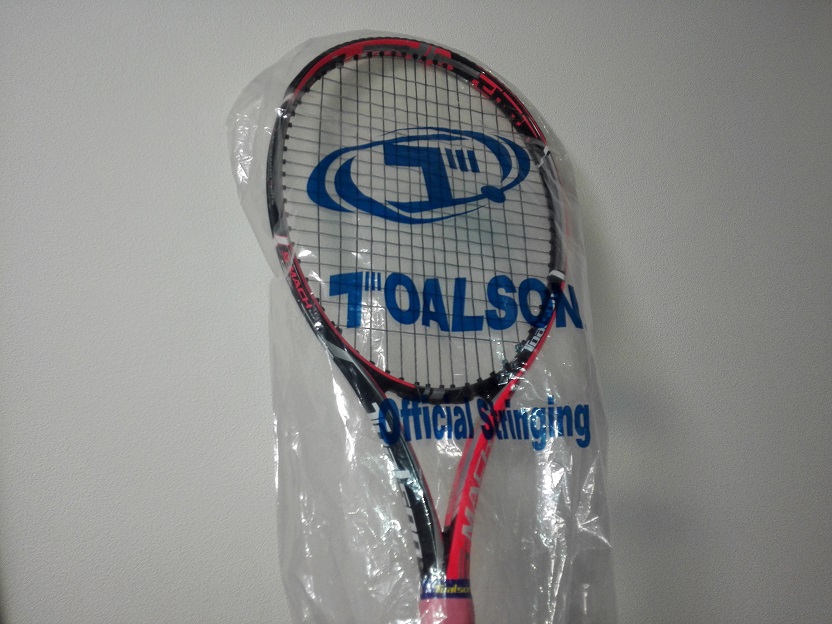
という事で来年はエスマッハツアーを使う予定です。
3年前に買ってラケットマイスター・・・の前身のラケットスタジオさんで280gを305gにチューンナップ。
それを2018年の5月頃まで使っていたけど、その後別のラケットに。
そんで今になって引っ張り出して、ライズテニスサービスさんで305gから315gにしてもらったのがこの前。
そして今は自分でバランス微調整しながらテニスオフでダブルスを入れて試していましたが、まあほぼ確定でしょう。
こういうフレームの厚いラケットを重くすると空気抵抗が心配なので前は305gに抑えていたのですが、やっぱその設定だと物足りないなと最近感じ始め、手応えが欲しかったので増量。
不明瞭ですけど重さがあるって手応えがボールを叩いた威力の他に、コントロール性も影響あるかなって思う。
来年は市民大会で良い戦績を出せるようにダブルスだけに絞りたいと思っていまして。
それでフレームの厚いエスマッハツアーの飛びでとにかくゴリ押し、速攻でポイントを取り、攻められてもボールをよく飛ばして守れるようにして。
こういう厚いフレームで不安なのはコントロールですが、まあ、短期決戦って事で・・・
それにエスマッハは中厚フレームの中では飛びを抑えているタイプですし、それで抑え切れなかったらそれは情けない自分の腕の問題。
昨年グリンタ98を購入した時はしばらくこれで行くと決めていて、実際グリンタの恐ろしい程までのコントロール性能、何の心配もなくボールがコートに入っていく性能は手放すのが非常に怖く感じるぐらいですが、どうしても気になるのが反発力の低さ。
最初の内はまだ良かったのですがコロナの自粛明けでテニスを再開すると、もうボールが全く飛ばない。
コートが閉まっていた時期からもう大分経っているし腕も戻っているとは思うのですが、テニスのプレーが結構変わってしまった感があり、現状飛ばないグリンタはキツいなとなりました。
市民大会も全部中止になったので活躍の機会は無し・・・。
ビタスが手頃な値段で手に入ればスノワートのコントロール性能を頼りたいと思っていましたが、丁度良いタイミングは来なかったのでエスマッハに。

(写真は去年のだけど)
でも当初はエスマッハツアーではなくエスマッハプロに乗り換えようかと考えていて、プロの方を先々月、先月と使っていました。
エスマッハプロはちょっと薄いとはいえ、振り抜き易く、しっかりしたフレームでパワーロスを感じさせない剛性感。
ボールをぶっ叩き易く力強いボールが飛ぶ。
ラケットのパワーを借りたいという点で打ってつけですし、さらにコントロール性もしっかりしていて良かったので乗り換えの最有力候補でした。
ぶっちゃけツアーでもプロでもどちらでも良いかな・・・ってところはあるのですが、ツアーの方が本数持っていたので、コスト的な面でこっちにしちゃったかなぁ・・・なんちゃって。
あとは少しでも楽を・・・ってのが働いちゃったかな。
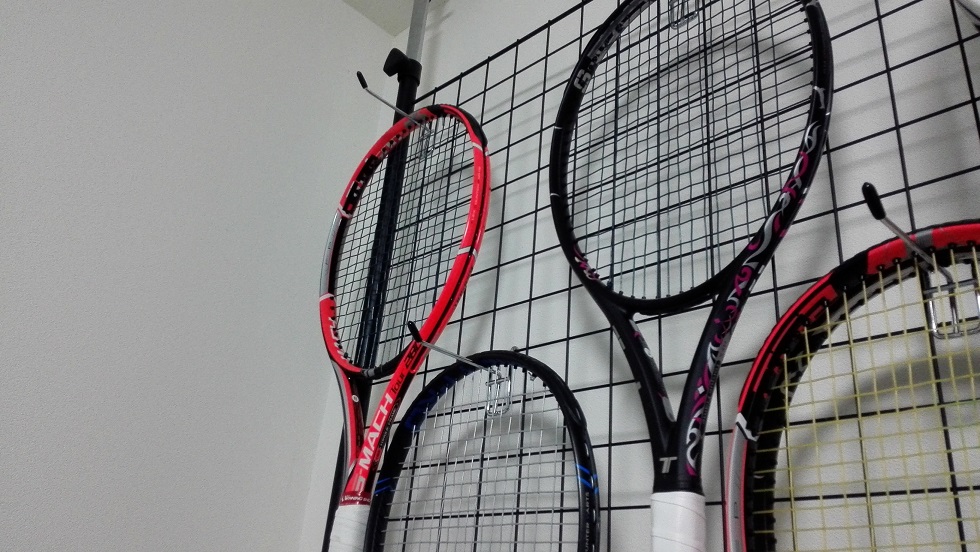
中厚ラケットで行くにしても、我が家には後継機のエスマッハツアーXFもあったので、じゃあこれもどうするのと。
XFはプレミアムカーボン30Tを内蔵して飛びもスピンも強化している発展型。
でも自分として気になるのがストリングホールの大きさの違い。
初代ツアーはストリングを動かす為に穴を大きくしていますが、XFでは大きさを絞っています。
それによってXFのスピード感がアップしているのですが、自分としては初代のネッチョリとボールを掴む感覚の方が好きだったのでXFは見送りに。
中厚ラケットのパワーでゴリ押したいと言いつつも、攻撃力で勝るXFを使わないという判断は矛盾していますが・・・
XFは感覚的にはエスマッハプロの100インチ版みたいに思っていて、ボールを叩く時の威力は間違いなく初代よりXF。
このXFの感覚も97インチのプロにとても近くてやはり好きな感覚ではある。
シバき倒す攻撃型のXFに対し、初代はなんでしょ・・・ホールド感、遅いスイングでの飛び、守りのプレー寄りの印象。
そっちの方が安心するのかなぁ自分は。
それと、前に初代使ってた時が一番自分のパフォーマンスが良かったと何となく思ってる。
ボールのパワーで押すのならXF、もっと言うとピュアアエロの方がパワーもスピンも凄い。
でもエスマッハツアーなら実戦で何だかんだで結果を出してくれる。
飛び、スピン、コントロールのバランスが良いからだと思う。
トアルソンのラケットはそういうバランス型が多い印象。
他メーカーに比べて後発気味だからこそそのタイプの弱点を補完しに来ているような。
ストリングは昔使っていた時と同様、縦がデビルスピン、横がポリジナモスでどちらも1.25mmの45ポンド。
昔ってかグリンタもエスマッハプロも同じセッティングでしたけど。
ポリジナモスが緩く張るととても反発力が出るので、それを縦のデビルスピンで抑え込む。
それでいてポリジナモスは球持ちのあるマイルドな打球感なのも良い。
でも中厚ラウンドのエスマッハだと弾きが早くなってすぐ飛んでいってしまう感じなので、どうしようかというところ。
横にナチュラルを噛ませるか、縦のデビルスピンを太くして球持ちを増やすか。
ナチュラルだと雨天決行が非常に多い市民大会や草大会が不安であるが・・・。
結局ナチュラルに代わるストリングはそうそうないし、だったらいっその事ナイロンでもいいのでは?と思ってきている。(在庫している6mのタフガット7張から目を背けながら
目をつけているのはムゲンリミテッド。
昔先輩にフェデ張りで張ったらスナップバック性が良く、反発力も凄かったので期待している。
普通のムゲンは外側のコーティングがいかにもポリウレタン使ってますって感じで抵抗が強かった印象だけど、リミテッドはやたら良かった。
一度しか使ってないのでそれが継続されるかは分からないので、そろそろ試そうと購入まではした。
でも縦糸に張ったらスピンは凄そうだけど、横糸だとナチュラルみたいな収まりの良さは出てくれるのだろうか・・・
ナチュラルって飛びが凄いと言うよりかはホールド感とのバランスの良さな感じがする。
マルチだと柔らか過ぎるだけだったり、飛びがちょっとナチュラル超えてない?ってなったり、一部分ではナチュラルより凄いだろうけど、バランスがなぁ・・・ってところがある。
という事で最有力候補はデビルスピン1.30mmかなぁ、でも1.25mmでも別にいいかなぁというところもある。
色々試したい事ばかりですがとりあえず今はバランス調整中って事で、テニスの日はダブルスばっかで過ごしているこの頃です。












pg slot เกมสล็อตออนไลน์ที่คนค้นหาเยอะ เล่นง่าย ฝากถอนเร็ว คำค้นหา pg slot ถูกค้นหามากขึ้นเรื่อยๆ ในกลุ่มผู้เล่นเกมสล็อตออนไลน์ เพราะเป็น ผู้ให้บริการเกมสล็อตที่มาแรง ด้าน ภาพและเอฟเฟกต์ ความ ลื่นไหล และ โอกาสรับกำไรที่ดี เกมของ PG ผลิตโดยค่ายมาตรฐาน ที่รองรับการเล่นทั้งบน สมาร์ทโฟน และ พีซี ความโดดเด่น ของ pg slot สล็อต PG เป็นเกมสล็อตออนไลน์ที่ออกแบบมาให้ โหลดเร็ว เล่นผ่าน ระบบเว็บ และรองรับ ทั้ง iOS และ Android เข้าเล่นผ่านเว็บได้เลย ผู้เล่นสามารถเข้าเล่นผ่าน Browser ได้ทันที ภาพและเสียงถูกพัฒนาในรูปแบบ สามมิติ ให้ความคมชัด พร้อมเอฟเฟกต์ สวยงาม คุณสมบัติหลักของเกม pg slot ได้แก่ โบนัสและฟรีสปินหลายแบบ Multiplier เดโม่ฟรี ใช้งานภาษาไทยง่าย ระบบการเงินรวดเร็ว ทำรายการไว แพลตฟอร์ม pg slot ส่วนใหญ่รองรับ การฝาก-ถอน ฝากถอนตลอดเวลา ขั้นต่ำเริ่มต้นเพียง หลักหน่วย ขึ้นอยู่กับ ระบบของผู้ให้บริการ การทำรายการใช้เวลา เพียงไม่กี่วินาที ผ่าน คิวอาร์โค้ด หรือระบบ Mobile Banking ทำให้ธุรกรรมเป็นไปอย่าง ลื่นไหล แนวเกมที่คนเล่นเยอะ ใน pg slot เกม PG Slot มีธีมหลากหลาย เช่น ธีม เทพเจ้าและแฟนตาซี ธีม Adventure ธีม โชคลาภ ธีม ธรรมชาติ หลายคนชอบเกมที่โบนัสเข้าไว พร้อมระบบ ฟีเจอร์พิเศษ และ อัตราการจ่ายที่สูง เหมาะกับทั้ง คนเพิ่งเล่น และ ผู้เล่นมือโปร ความปลอดภัย pg slot มีมาตรฐานรองรับ มีการ เข้ารหัสข้อมูล และใช้ระบบสุ่มผล Random Number Generator เพื่อให้ผลลัพธ์ โปร่งใส แพลตฟอร์มที่ให้บริการ pg slot ควรมี ทีมซัพพอร์ต 24 ชม. บทสรุปท้ายบท pg slot เป็นตัวเลือกยอดนิยมสำหรับผู้ที่ต้องการเล่นสล็อตออนไลน์ ด้วยจุดเด่นด้าน กราฟิกคุณภาพ และการทำธุรกรรมที่ ไว ผู้เล่นสามารถเริ่มต้นได้ ไม่ซับซ้อน ฝากถอนสะดวก และเลือกเกมได้ หลากหลายแนว เหมาะสำหรับ ทุกระดับประสบการณ์ ในโลกของเกมสล็อตออนไลน์
?Salud por cada explorador de riquezas !
En resumen, los mejores casinos online europeos se caracterizan por su compromiso con la seguridad, la variedad de juegos y la experiencia del usuario. . Estas plataformas estГЎn conectadas a las Гєltimas tendencias y tecnologГas del mercado. Al explorar el mundo del juego online, es esencial elegir aquellos que cumplan con altos estГЎndares.
El diseГ±o y la interfaz de usuario son aspectos importantes en los mejores casinos europeos online. Un sitio bien diseГ±ado facilita la navegaciГіn y mejora la experiencia general del jugador. Las actualizaciones frecuentes aseguran que los usuarios siempre disfruten de la mejor experiencia posible.
Juega con confianza en los mejores casinos online europeos seguros – https://casinos-online-europeos-chi.vercel.app/#
?Que la suerte te acompan~e mientras disfrutas de increibles rondas emocionantes !
?Levantemos nuestros brindis por cada forjador de la prosperidad !
La integraciГіn de mГ©todos de pago modernos, como billeteras electrГіnicas, es comГєn en los casinos online Europa. . Esto facilita el proceso de depГіsito y retiro. La inmediatez en las transacciones es una necesidad que muchos jugadores valoran.
Las opciones de entretenimiento no se limitan a los juegos en el casino Europa. TambiГ©n podrГЎs disfrutar de ritmos en vivo y espectГЎculos de danza. Este enfoque integral hace que el casino Europa sea espectacular.
Las mejores caracterГsticas de los casinos europeos online actuales – http://casinosonlineeuropeos.vercel.app/
?Que la fortuna avance contigo con sorpresas infinitas recompensas sorprendentes !
rufus Rufus is known as a compact free open source utility designed to make bootable USB drives. It allows you to prepare a USB flash drive that can set up an operating system launch diagnostic tools or boot into a recovery environment. The program does not require installation and can be launched right after download. The main purpose of Rufus is to create bootable USB media from ISO images fast and reliably. This allows users to install or run operating systems directly from a USB flash drive without the need for DVDs. The tool works with a large number of operating systems and service utilities which makes the program useful for both regular users and system administrators. Rufus runs on computers with Microsoft Windows starting from Windows 7. Both 32-bit and 64-bit versions are supported and there is also a version available for ARM64 architecture. The software allows users to create bootable USB drives from many different ISO images. It can be used to prepare a USB drive for installing Windows 11 Windows 10 Windows 8.1 or Windows 7 as well as various Linux distributions. Rufus also works with DOS systems and other recovery or maintenance tools commonly used for troubleshooting computers. One of the integrated features of Rufus is the ability to download official Windows ISO images directly from Microsoft servers. This allows users to obtain original installation images for Windows 8.1 Windows 10 and Windows 11 without searching for them on third-party websites. In addition to creating bootable drives Rufus can format USB devices. It supports several file systems including FAT32 NTFS exFAT UDF and ReFS. This flexibility allows the USB drive to be prepared for different use cases and compatibility requirements. Rufus supports both legacy BIOS systems and modern UEFI environments. Because of this bootable drives created with Rufus can work on older computers as well as newer systems that use UEFI and Secure Boot. Another feature included in Rufus is Windows To Go support. This option allows users to run a full Windows environment directly from a USB drive. It can be useful for testing systems performing maintenance or working on multiple computers without installing Windows on the internal drive. Rufus also provides the option to bypass certain Windows 11 installation requirements. When creating an installation USB the program can disable checks for TPM 2.0 Secure Boot and minimum RAM requirements. This makes it possible to install Windows 11 on computers that would otherwise not meet the official hardware requirements. One of the reasons Rufus has become popular is its speed and simplicity. The program is extremely small about 1.9 MB in size and runs as a portable application without installation. It is distributed under the GPL v3 open-source license supports more than 70 languages and contains no advertisements bundled software or tracking components. Rufus works with a large number of ISO images. These include multiple versions of Windows Windows Server editions FreeDOS and various system tools such as GParted Hiren’s Boot CD Parted Magic and Clonezilla. Because of this wide compatibility the program can be used not only for installing operating systems but also for disk management data recovery and system maintenance tasks. To use Rufus a computer running Windows 7 or later and a USB flash drive are required. The program does not need to be installed. Users simply download the executable file run it select the ISO image they want to use and create a bootable USB drive. Due to its simplicity speed and reliability Rufus remains one of the most widely used tools for creating bootable USB drives.
rufus Rufus is a small free open source utility designed to make bootable USB drives. It allows you to prepare a USB flash drive that can set up an operating system launch diagnostic tools or boot into a recovery environment. The program requires no installation and can be run as soon as it is downloaded. The primary purpose of Rufus is to create bootable USB media from ISO images quickly and reliably. This lets people install or run operating systems directly from a USB flash drive without the need for DVDs. The tool works with a broad selection of operating systems and service utilities which makes the program useful for both regular users and system administrators. Rufus runs on computers with Microsoft Windows starting from Windows 7. Both 32-bit and 64-bit versions are supported and there is also a version available for ARM64 architecture. The software allows users to create bootable USB drives from many different ISO images. It can be used to prepare a USB drive for installing Windows 11 Windows 10 Windows 8.1 or Windows 7 as well as various Linux distributions. Rufus also works with DOS systems and other recovery or maintenance tools commonly used for troubleshooting computers. One of the integrated features of Rufus is the ability to download official Windows ISO images directly from Microsoft servers. This allows users to obtain original installation images for Windows 8.1 Windows 10 and Windows 11 without searching for them on third-party websites. In addition to creating bootable drives Rufus can format USB devices. It supports several file systems including FAT32 NTFS exFAT UDF and ReFS. This flexibility allows the USB drive to be prepared for different use cases and compatibility requirements. Rufus supports both legacy BIOS systems and modern UEFI environments. Because of this bootable drives created with Rufus can work on older computers as well as newer systems that use UEFI and Secure Boot. Another feature included in Rufus is Windows To Go support. This option allows users to run a full Windows environment directly from a USB drive. It can be useful for testing systems performing maintenance or working on multiple computers without installing Windows on the internal drive. Rufus also provides the option to bypass certain Windows 11 installation requirements. When creating an installation USB the program can disable checks for TPM 2.0 Secure Boot and minimum RAM requirements. This makes it possible to install Windows 11 on computers that would otherwise not meet the official hardware requirements. One of the reasons Rufus has become popular is its speed and simplicity. The program is extremely small about 1.9 MB in size and runs as a portable application without installation. It is distributed under the GPL v3 open-source license supports more than 70 languages and contains no advertisements bundled software or tracking components. Rufus works with a large number of ISO images. These include multiple versions of Windows Windows Server editions FreeDOS and various system tools such as GParted Hiren’s Boot CD Parted Magic and Clonezilla. Because of this wide compatibility the program can be used not only for installing operating systems but also for disk management data recovery and system maintenance tasks. To use Rufus a computer running Windows 7 or later and a USB flash drive are required. The program does not need to be installed. Users simply download the executable file run it select the ISO image they want to use and create a bootable USB drive. Due to its simplicity speed and reliability Rufus remains one of the most widely used tools for creating bootable USB drives.