

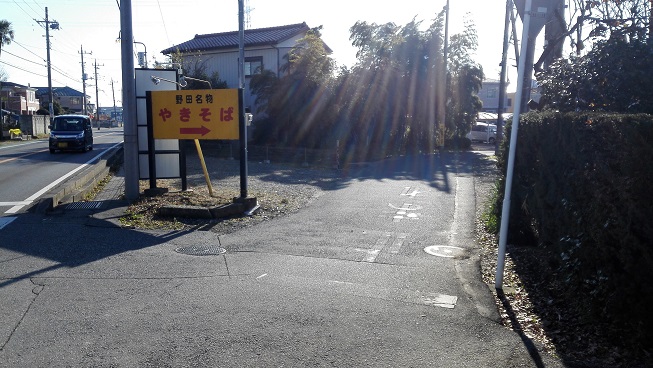
吉田記念テニス研修センターへの道中、グーグルマップの導きでバスを降りて徒歩15分コースで見た看板。
恥ずかしながら千葉について無知な私はとにかく千葉=海というイメージ浮かびませんが、今回初めて来た野田市はイメージを裏切って内陸の市で、埼玉と茨城と隣になっているらしい。
自分は来月にまた野田市に来る予定になっているので、焼きそばが名物ならば今度是非食べてみようと思った。
・・・って野田市に来た気分でしたが、今調べたらテニス研修センターの住所は柏市で、そもそも自分が降りた駅も北柏駅だから野田市には足を踏み入れていないじゃないか。
ともかく、来月は野田市のロイヤルSCテニスクラブで行われる関口周一プロ、江原弘泰プロ、志賀正人プロ3人によるテニスクリニック、この豪華な初打ちに参加させて頂ける事となりました。
まさかこんなチャンスが出てくるなんて思いもせず、関口プロの突然の開催発表のツイートには驚きましたね。
現役プロ3人集まっちゃいました!
豪華テニスクリニック開催 
参加選手紹介・・・皆小柄だけど足速いよ。粘るよ。ファイターだよ。
関口選手のイメージって、テニスプロは辛いよって本も出しているし結構世間だとシビアな世界を戦っている若者って感じじゃないでしょうか。(自分は未読なのでどんなイメージで書かれているかは知りませんが)
それでこのノリですよ、皆小柄だけど足速いよ!って。
3人全員紹介が走る人って!ざっくり過ぎじゃないスか!?
それと同世代で集まったという事ですが、確か関口プロってツイッターでよく内山プロと絡んでいたり、大会の会場でも一緒に練習しているところも見ましたし学年が1個だけ違えど結構仲良いように見えたのですが、身長デカいからハブられたんでしょうか。
って思ったけど関口プロ、江原プロ、志賀プロの3人全員が同い年という事でこのメンバーっぽいですね。決してハブられたんじゃないのね。
それにしても同い年で似たような身長の選手が揃うのも珍しい。
ちなみに内山プロ(183cm)の92年生まれで3人数えてみるとダニエル太郎(191cm)、勉(185cm)で大柄日本人チームが組めますね。
この3人はデ杯で見れますが、91年チームに対抗(?)して豪華クリニックなんて日も来たりしないものだろうか。
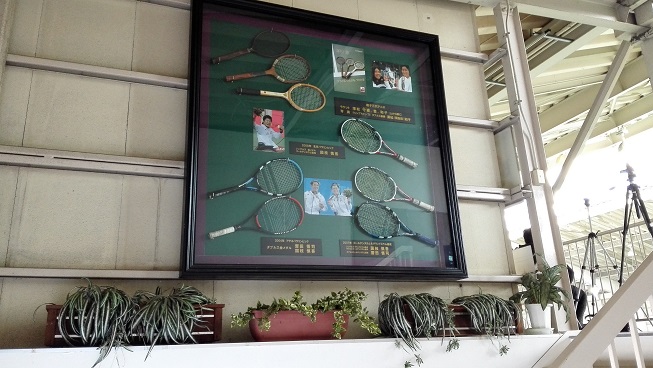
二階席への階段に飾られていた国枝選手らのラケット。
吉田記念テニス研修センターでは指導者やジュニア選手、そして車椅子テニスの選手のトップ層の育成を行っているという事で、特に車椅子テニスの事に関しては多くの歴史が詰まっている。
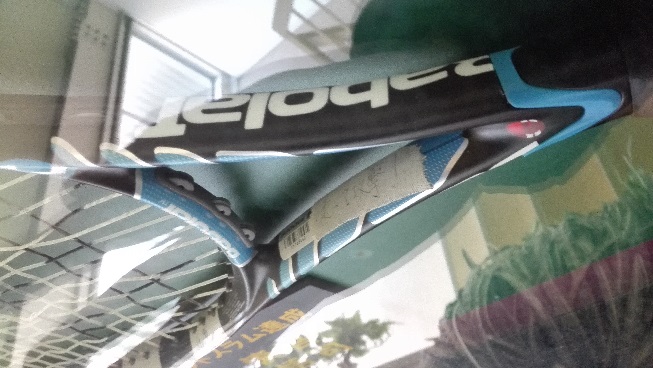
ラケットのスロートに言葉を書いたテーピングを貼る、と言うと国枝選手の「俺は最強だ!」がとても有名かと思いますが、当然彼だけの願掛けではない。
写真は齋田悟司選手のラケット。「走って攻撃!」
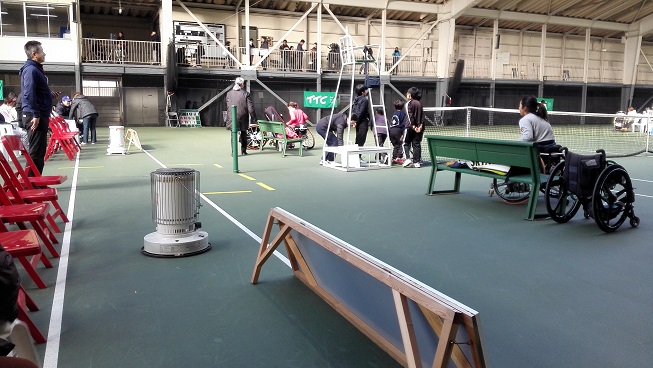
室内コートと聞いていたがとても寒く、来場者にはホッカイロが配られ、来賓席にはストーブも置かれていた。
そもそも自分が室内コートでやる機会が無いので分かりませんが、室内コート=暖かいと勝手に思っていました。
気になった事はありませんでしたが有明コロシアムはどうなのかな。
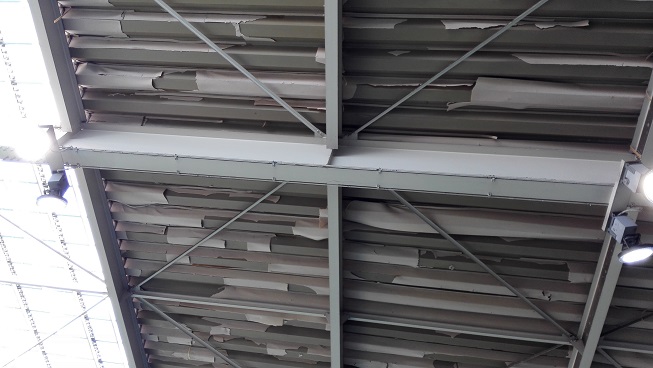
ふと天井を見上げたらこんな感じ。大丈夫なのだろうか。












screen capture software Best Screenshot Tool for Windows 10 & 11 If screenshots are a regular part of your workflow the built-in Windows Snipping Tool quickly starts to feel limiting. Multiple steps no cloud support no instant sharing links and sluggish interaction make it unsuitable for today’s workflows. A modern screenshot tool should be invisible fast and optimized around a single flow: capture upload share. This minimal screenshot tool for Windows 10 & 11 is designed precisely for this purpose. Hit PrtScn choose any screen area release and the screenshot is uploaded immediately. The sharing link is placed in your clipboard automatically. No save prompts no directories no manual file handling. Area capture works precisely and predictably. A simple crosshair selector enables pixel-level accuracy which makes capturing UI elements code snippets charts or partial screens effortless — faster and more dependable than the default Snipping Tool. Capturing the entire screen is just as easy. Use Shift PrtScn to capture the entire desktop instantly. The result is a full-resolution screenshot ideal for documentation presentations or bug reporting without delays or popups breaking the workflow. The primary benefit is immediate cloud upload. Each screenshot is uploaded automatically and the link is available in milliseconds. You can paste the link directly into chats emails or support tickets without dealing with files or third-party image hosts. The application runs quietly in the system tray and is designed to stay out of your way. RAM usage stays below 50MB startup is instant with an installer that is only 2MB. When compared to heavier alternatives like Greenshot Lightshot or ShareX the performance and responsiveness difference is obvious immediately. Privacy is handled responsibly. No ads no analytics no tracking and no background data collection. Screenshots often contain sensitive information and this tool treats them accordingly — with nothing unnecessary running in the background. Hotkeys are fully customizable. You can assign PrtScn CtrlShiftS or any shortcut you want and adjust image quality or behavior without heavy settings panels or cluttered menus. The default Windows Snipping Tool works but only handles capture. It provides no cloud workflow no instant sharing and no performance optimization. This tool serves as a replacement by focusing on what matters most: capturing information and sharing it instantly. If screenshots are part of your daily work in development support remote work or documentation — speed and simplicity are essential. A proper screenshot tool should feel built into the system not like a separate application.
fc777 login offers the best slot machines and generous bonuses for all players. This text seeks to deliver a detailed insight into fc777.
Take a chance in exciting online games on puma777 and experience thrilling entertainment filled with excitement and fun. Users can find an assortment of features available to suit their specific demands on the platform.
Try your luck and enjoy the thrill of playingrol casinodirectly on your device. Many modern casinos adopt a royal theme to attract gamblers.
Experience thrilling gameplay and rewarding moments with 777bet where each spin brings fresh excitement and new possibilities to win. New users often benefit from welcome bonuses while existing players enjoy regular promotions and loyalty rewards.