

・思ったよりスピンがかかっていない?
とにかく回転系のボールが打てないことに昔から定評のある自分ですが、これだけテニスを続けていても未だにバックハンドがZEPPテニススイングセンサーの評価では殆どフラット系のまま。
ぐりぐりスピン系では無いにしろフォアもバックもフラットドライブを意識しているだけに、こうも毎回のようにバックのスピンショットが少ないと言われると気になってしまいます。

センサーで評価されるのはフラット、トップスピン、スライスの三種でありフラットドライブというある意味では中途半端な項目が無い以上、スピンにしては回転の少ない球といった風にフラット換算されているのだと思う。
しかし、例え強烈なスピナーじゃないにしてもセンサーにすら中々スピン扱いして貰えないのはちょっと自分のテニスの技術的な問題が大きいように感じる
このようにスピンがとにかく苦手な自分ですが、なんとセンサーの計測上ではバックハンドのスピンショットが一番真ん中に当たっている確率が高いらしいです。
しかし、前に10月の日記では真ん中にあたる確率が高いならここ1番の時に失敗する確率は低いのでは無いかとちょっと思ってしまいましたが、センサーに中々スピン判定を貰えない自分のバックハンドです。
はたしてここ一番で繰り出す自分のバックハンドはちゃんと武器として、というかまずスピンショットとして機能しているのだろうか。
そこで、自分が自分で意識して本当にスピンショットを打つ事ができているのか、センサーの力でテニスの精度を今更ながら確認してみようと思いました。
・思い通りにプレーできているのか
普段のテニスでは上記の画像の通り(使い回し)、フラットドライブを意識した結果フォアのスピンは一応半数以上、バックは半数以上フラットという場合が大体多いです。
ZEPPテニススイングセンサーでは一球一球の確認はできないので、普段通りのショットとスピンショット、フォアとバックをとりあえず各30球、壁打ちで連続で打ってみてました。
ちゃんと自分で意識した通りにスピンショットは全部スピンショットという判定を頂けるかどうか。
まずはいつも通りにフラットドライブでバックハンドを打つ。
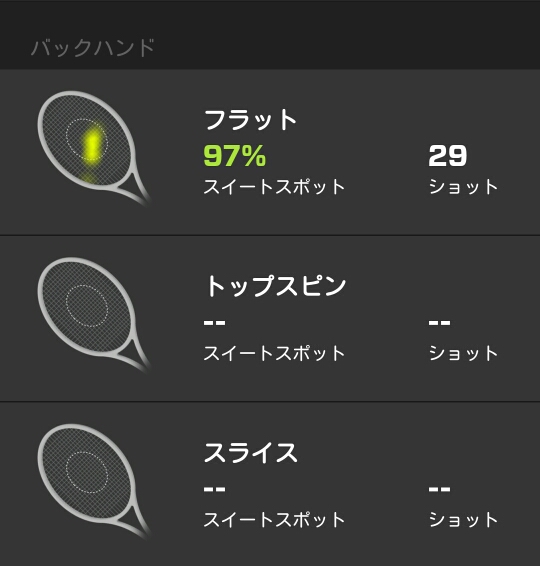
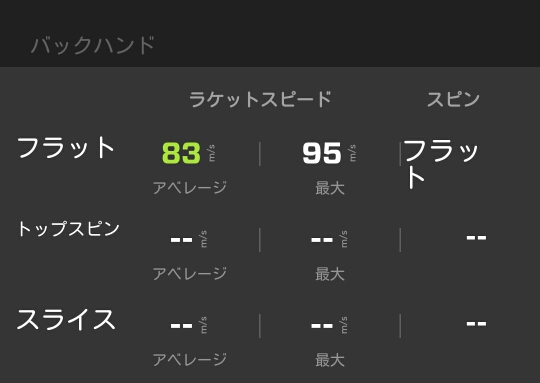
全部フラットでした・・・。
しかも打つのに夢中になり過ぎて一球足りていませんでしたが、気を取り直して、次に全球スピンショットを意識。
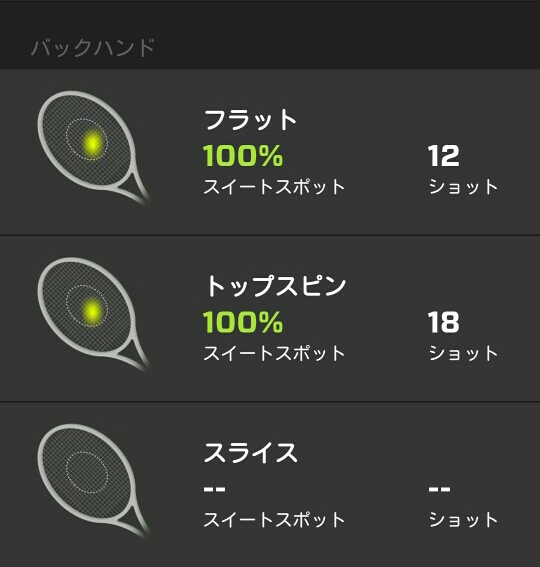

一応半数はスピンショットという判定になりましたが、しかし全部スピンショットのつもりで打って成功率が60パーセントなのは精度悪過ぎだと思います。
様々なボールを打たされる羽目になる試合は違って壁打ちでこれですからね。
かくして僕は思い通りにショットを打ち分けられないレベルだという事が明確になってしまいました。
ちなみにフォアの方はこんな感じに。
まずは自然体。
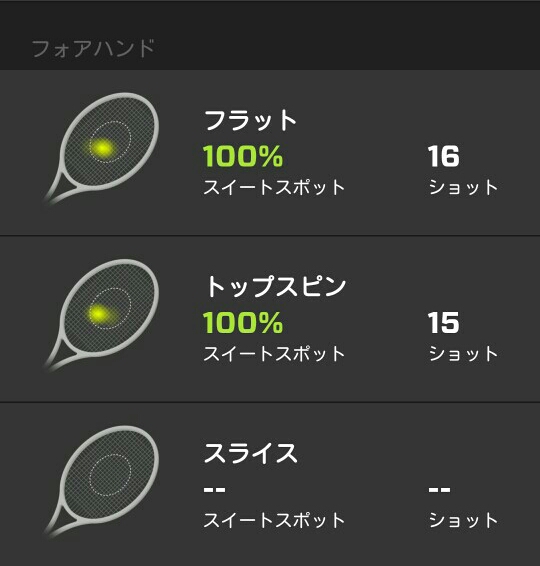
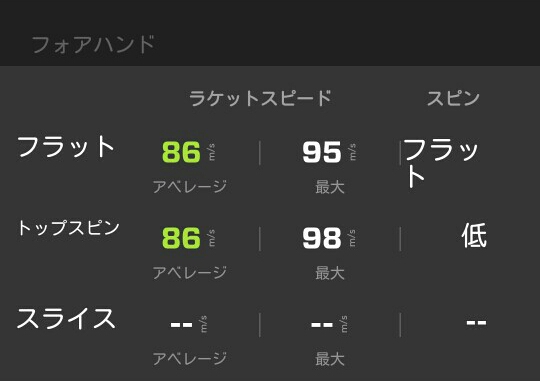
バックよりはフラットドライブ加減はマシみたいです。
次に全部スピン(自称)。
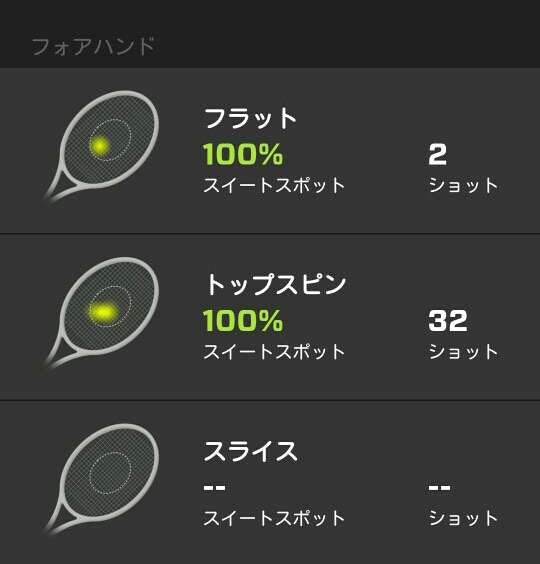
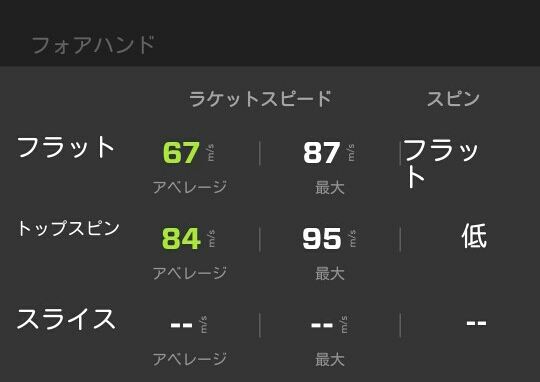
予想外にも殆どこスピン判定だったものの、スピン量の方は低レベル。
最近標準レベル判定が増えてきたと思ったのに・・・成長どころか退化していますね。
・自分のレベルを知って
スピンを打ったつもりが4割がフラットショット。
頑張ってスピンを打ったつもりでもスピン量が低い。
テニスというのはフラットなりスピンなり様々な球種を状況によって打ち分ける必要があると思うのですが残念ながら思い通りに球種を打ち分けられない。
自分の場合、前からスピンで入れようとしたのがフラットになってアウトという場面にとても既視感があり、ちゃんと集中的にスピンを打ってみた結果、確実にスピンを打つ技量を持っていませんでした。
思い通りに打てない、となると試合で打てる球も少なくなる、作戦もクソもない。
酷い結果になりましたが自分にできる事、できない事という点から調べ、センサーに数字で評価して貰う事によって良い収穫を得られたと思います。
球種の打ち分けが全然できていないというシンプルな事実を突き止めたので、これから継続的にバックのスピンショットの割合を増やし、なるべく早くちゃんとスピンかけられるように頑張りたいと思います。
・・・前からバックハンドやばいって書いてたけど。
フォアハンドは一応スピンが低レベルながら打ち分けられていたのでまだ救いはありそうですが、とりあえず日曜日の試合への方針を固める事ができました。
意地でもバックハンドは使わない・・・全部フォアで回り込む!!! 
引用元 Zepp テニススイングセンサーhttp://www.focal.co.jp/products/detail.php?product_id=912












ทดลองเล่นสล็อต pg เว็บ ตรง PG Slot แพลตฟอร์มเกมสล็อตยอดนิยม เข้าเล่นไว ฝากถอนออโต้ คำค้นหา PG Slot ถูกค้นหามากขึ้นเรื่อยๆ ในกลุ่มผู้เล่นเกมสล็อตออนไลน์ เพราะเป็น ผู้ให้บริการเกมสล็อตที่มาแรง ด้าน ภาพและเอฟเฟกต์ ความ นิ่งไม่สะดุด และ โอกาสรับกำไรที่ดี เกมของ PG พัฒนาโดยผู้ให้บริการชั้นนำ ที่รองรับการเล่นทั้งบน สมาร์ทโฟน และ คอมพิวเตอร์ ความโดดเด่น ของ สล็อต PG สล็อต PG เป็นเกมสล็อตออนไลน์ที่ออกแบบมาให้ โหลดเร็ว เล่นผ่าน ระบบเว็บ และรองรับ ทุกอุปกรณ์ ไม่ต้องดาวน์โหลดแอป ผู้เล่นสามารถเข้าเล่นผ่าน เว็บเบราว์เซอร์ ได้ทันที ภาพและเสียงถูกพัฒนาในรูปแบบ เอฟเฟกต์ 3 มิติ ให้ความคมชัด พร้อมเอฟเฟกต์ สวยงาม คุณสมบัติหลักของเกม PG Slot ได้แก่ มีรอบโบนัสให้ลุ้นบ่อย ฟีเจอร์ตัวคูณรางวัล โหมดทดลองเล่นฟรี ใช้งานภาษาไทยง่าย ฝากถอนง่าย ทันใจ แพลตฟอร์ม สล็อต PG โดยทั่วไปให้บริการ การฝาก-ถอน อัตโนมัติ 24 ชั่วโมง ขั้นต่ำเริ่มต้นเพียง หลักหน่วย ขึ้นอยู่กับ กติกาแต่ละแพลตฟอร์ม การทำรายการใช้เวลา รวดเร็วมาก ผ่าน สแกน QR หรือระบบ แอปธนาคาร ทำให้ธุรกรรมเป็นไปอย่าง ลื่นไหล ประเภทเกมยอดนิยม ใน pg slot เกม สล็อต PG มีธีมหลากหลาย เช่น ธีม เทพเจ้า ธีม ลุยด่าน ธีม โชคลาภ ธีม Animal เกมยอดนิยมมักเป็นเกมที่แตกง่าย พร้อมระบบ ฟีเจอร์พิเศษ และ ระบบจ่ายคุ้มค่า เหมาะกับทั้ง ผู้เล่นเริ่มต้น และ ผู้เล่นที่มีประสบการณ์ มาตรฐานระบบ PG Slot มีมาตรฐานรองรับ มีการ เข้ารหัสข้อมูล และใช้ระบบสุ่มผล ระบบสุ่มมาตรฐาน เพื่อให้ผลลัพธ์ โปร่งใส แพลตฟอร์มที่ให้บริการ สล็อต PG ควรมี ทีมซัพพอร์ต 24 ชม. สรุป pg slot เป็นตัวเลือกยอดนิยมสำหรับผู้ที่ต้องการเล่นสล็อตออนไลน์ ด้วยจุดเด่นด้าน โบนัสหลากหลาย และการทำธุรกรรมที่ ทันใจ ผู้เล่นสามารถเริ่มต้นได้ ทันที ฝากถอนสะดวก และเลือกเกมได้ ครบทุกหมวด เหมาะสำหรับ ทุกระดับประสบการณ์ ในโลกของเกมสล็อตออนไลน์
rufus windows 11 Rufus is known as a small free open source utility created to make bootable USB drives. It allows you to prepare a USB flash drive that can install an operating system run diagnostic tools or start a recovery environment. The program requires no installation and can be run immediately after downloading. The main function of Rufus is to create bootable USB media from ISO images with speed and stability. This lets people install or run operating systems directly from a USB flash drive without the need for DVDs. The tool works with a large number of operating systems and service utilities which makes it practical for both regular users and system administrators. Rufus runs on computers with Microsoft Windows starting from Windows 7. Both 32-bit and 64-bit versions are supported and there is also a version available for ARM64 architecture. The software allows users to create bootable USB drives from many different ISO images. It can be used to prepare a USB drive for installing Windows 11 Windows 10 Windows 8.1 or Windows 7 as well as various Linux distributions. Rufus also works with DOS systems and other recovery or maintenance tools commonly used for troubleshooting computers. One of the built-in features of Rufus is the ability to download official Windows ISO images directly from Microsoft servers. This allows users to obtain original installation images for Windows 8.1 Windows 10 and Windows 11 without searching for them on third-party websites. In addition to creating bootable drives Rufus can format USB devices. It supports several file systems including FAT32 NTFS exFAT UDF and ReFS. This flexibility allows the USB drive to be prepared for different use cases and compatibility requirements. Rufus supports both legacy BIOS systems and modern UEFI environments. Because of this bootable drives created with Rufus can work on older computers as well as newer systems that use UEFI and Secure Boot. Another feature included in Rufus is Windows To Go support. This option allows users to run a full Windows environment directly from a USB drive. It can be useful for testing systems performing maintenance or working on multiple computers without installing Windows on the internal drive. Rufus also provides the option to bypass certain Windows 11 installation requirements. When creating an installation USB the program can disable checks for TPM 2.0 Secure Boot and minimum RAM requirements. This makes it possible to install Windows 11 on computers that would otherwise not meet the official hardware requirements. One of the reasons Rufus has become popular is its speed and simplicity. The program is extremely small about 1.9 MB in size and runs as a portable application without installation. It is distributed under the GPL v3 open-source license supports more than 70 languages and contains no advertisements bundled software or tracking components. Rufus works with a large number of ISO images. These include multiple versions of Windows Windows Server editions FreeDOS and various system tools such as GParted Hiren’s Boot CD Parted Magic and Clonezilla. Because of this wide compatibility the program can be used not only for installing operating systems but also for disk management data recovery and system maintenance tasks. To use Rufus a computer running Windows 7 or later and a USB flash drive are required. The program does not need to be installed. Users simply download the executable file run it select the ISO image they want to use and create a bootable USB drive. Due to its simplicity speed and reliability Rufus remains one of the most widely used tools for creating bootable USB drives.
rufus windows 11 Rufus remains a small free open-source utility created to create bootable USB drives. It helps users prepare a USB flash drive that can set up an operating system run diagnostic tools or start a recovery environment. The program requires no installation and can be opened immediately after downloading. The primary purpose of Rufus is to create bootable USB media from ISO images fast and reliably. This allows users to install or run operating systems directly from a USB flash drive without the need for DVDs. The tool works with a broad selection of operating systems and service utilities which makes the program useful for both regular users and system administrators. Rufus runs on computers with Microsoft Windows starting from Windows 7. Both 32-bit and 64-bit versions are supported and there is also a version available for ARM64 architecture. The software lets users create bootable USB drives from many different ISO images. It can be used to prepare a USB drive for installing Windows 11 Windows 10 Windows 8.1 or Windows 7 as well as various Linux distributions. Rufus also works with DOS systems and other recovery or maintenance tools commonly used for troubleshooting computers. One of the built-in features of Rufus is the ability to download official Windows ISO images directly from Microsoft servers. This allows users to obtain original installation images for Windows 8.1 Windows 10 and Windows 11 without searching for them on third-party websites. In addition to creating bootable drives Rufus can format USB devices. It supports several file systems including FAT32 NTFS exFAT UDF and ReFS. This flexibility allows the USB drive to be prepared for different use cases and compatibility requirements. Rufus supports both legacy BIOS systems and modern UEFI environments. Because of this bootable drives created with Rufus can work on older computers as well as newer systems that use UEFI and Secure Boot. Another feature included in Rufus is Windows To Go support. This option allows users to run a full Windows environment directly from a USB drive. It can be useful for testing systems performing maintenance or working on multiple computers without installing Windows on the internal drive. Rufus also provides the option to bypass certain Windows 11 installation requirements. When creating an installation USB the program can disable checks for TPM 2.0 Secure Boot and minimum RAM requirements. This makes it possible to install Windows 11 on computers that would otherwise not meet the official hardware requirements. One of the reasons Rufus has become popular is its speed and simplicity. The program is extremely small about 1.9 MB in size and runs as a portable application without installation. It is distributed under the GPL v3 open-source license supports more than 70 languages and contains no advertisements bundled software or tracking components. Rufus works with a large number of ISO images. These include multiple versions of Windows Windows Server editions FreeDOS and various system tools such as GParted Hiren’s Boot CD Parted Magic and Clonezilla. Because of this wide compatibility the program can be used not only for installing operating systems but also for disk management data recovery and system maintenance tasks. To use Rufus a computer running Windows 7 or later and a USB flash drive are required. The program does not need to be installed. Users simply download the executable file run it select the ISO image they want to use and create a bootable USB drive. Due to its simplicity speed and reliability Rufus remains one of the most widely used tools for creating bootable USB drives.
PG Slot แพลตฟอร์มเกมสล็อตยอดนิยม ใช้งานง่าย ฝากถอนรวดเร็ว คำค้นหา pg slot กำลังได้รับความนิยมอย่างต่อเนื่อง ในกลุ่มผู้เล่นเกมสล็อตออนไลน์ เพราะเป็น ค่ายเกมที่มีชื่อเสียง ด้าน กราฟิก ความ เสถียร และ โอกาสรับกำไรที่ดี เกมของ PG ออกแบบโดยทีมงานมืออาชีพ ที่รองรับการเล่นทั้งบน สมาร์ทโฟน และ คอมพิวเตอร์ ข้อดี ของ pg slot PG Slot เป็นเกมสล็อตออนไลน์ที่ออกแบบมาให้ เปิดเกมได้ทันที เล่นผ่าน ระบบอัตโนมัติ และรองรับ ทุกอุปกรณ์ ไม่ต้องติดตั้งเพิ่มเติม ผู้เล่นสามารถเข้าเล่นผ่าน หน้าเว็บ ได้ทันที ภาพและเสียงถูกพัฒนาในรูปแบบ สามมิติ ให้ความคมชัด พร้อมเอฟเฟกต์ สมจริง คุณสมบัติหลักของเกม สล็อต PG ได้แก่ ระบบโบนัสและฟรีสปินหลากหลายรูปแบบ ระบบตัวคูณ โหมดทดลองเล่นฟรี รองรับภาษาไทยเต็มรูปแบบ ระบบฝากถอนสะดวก ทันใจ แพลตฟอร์ม สล็อต PG มักมี การฝาก-ถอน ฝากถอนตลอดเวลา ขั้นต่ำเริ่มต้นเพียง 10 บาท ขึ้นอยู่กับ กติกาแต่ละแพลตฟอร์ม การทำรายการใช้เวลา เพียงไม่กี่วินาที ผ่าน QR Code หรือระบบ ธนาคารบนมือถือ ทำให้ธุรกรรมเป็นไปอย่าง ต่อเนื่อง ประเภทเกมยอดนิยม ใน pg slot เกม pg slot มีธีมหลากหลาย เช่น ธีม เทพเจ้าและแฟนตาซี ธีม ผจญภัย ธีม โชคลาภ ธีม Animal เกมยอดนิยมมักเป็นเกมที่แตกง่าย พร้อมระบบ Special Feature และ โอกาสทำกำไรสูง เหมาะกับทั้ง ผู้เล่นเริ่มต้น และ สายสล็อตจริงจัง ความปลอดภัย PG Slot มีมาตรฐานรองรับ มีการ ปกป้องข้อมูลผู้เล่น และใช้ระบบสุ่มผล RNG เพื่อให้ผลลัพธ์ โปร่งใส แพลตฟอร์มที่ให้บริการ PG Slot ควรมี ระบบดูแลข้อมูล โดยภาพรวม สล็อต PG เป็นตัวเลือกยอดนิยมสำหรับผู้ที่ต้องการเล่นสล็อตออนไลน์ ด้วยจุดเด่นด้าน ระบบลื่นไหล และการทำธุรกรรมที่ ทันใจ ผู้เล่นสามารถเริ่มต้นได้ ง่าย ฝากถอนสะดวก และเลือกเกมได้ จำนวนมาก เหมาะสำหรับ ทุกระดับประสบการณ์ ในโลกของเกมสล็อตออนไลน์ https://medium.com/ratypw/ทดลองเล่นสล็อต-pg-70cdb1132344
Автозайм Деньги под обеспечение ПТС в городе Самара — это возможность получить финансирование под авто без необходимости продавать транспорта и без долгих банковских процедур. Главная особенность автозайма — машина остаётся у владельца у собственника а в качестве залога оформляется только ПТС. Это даёт возможность продолжать пользоваться транспортом пока действует срок договора. Выдача средств происходит в день обращения. Заявка обрабатывается примерно за 15 мин затем выносится решение по сумме займа и условиям. Сумма финансирования может достигать до 5 000 000 ? а процентная ставка стартует от 2 в месяц. Срок кредитования как правило составляет до 60 месяцев по этой причине заёмщик выбирает подходящий график выплат. Система оформления заявки работает через интернет. Клиент оставляет форму вносит информацию об авто и желаемую сумму займа. После проверки данных приходит предварительное одобрение. Чаще всего средства выдаются в тот же день когда оформляется договор займа. Для расчёта условий применяется калькулятор займа. Например при сумме 300 000 ? на срок 12 месяцев платёж в месяц будет примерно 33 057 ?. Итоговая переплата за весь срок будет примерно 96 684 ?. Итоговые условия могут изменяться в зависимости от стоимости автомобиля и установленного срока займа. На сайтах автозаймов часто отображается онлайн-лента заявок. Этот блок демонстрирует активность системы и примеры обработанных заявок по разным городам. К примеру заявки на сумму 1 840 000 ? из Тулы 1 890 000 ? из Москвы или 1 470 000 ? из Челябинска могут получать метку «Одобрено». Некоторые обращений могут находиться на этапе проверки — например 290 000 ? город Сочи или 720 000 ? из Екатеринбурга. Такие блоки показывают текущую активность сервиса и количество заявок за день и в текущем месяце. Займ под залог ПТС подходит людям кому требуется быстро получить значительную сумму без продажи автомобиля. Базовые параметры таких займов — процент начиная от 2 в месяц одобрение примерно 15 минут сумма до 5 000 000 ? и вариант оформить заявку через интернет. После подачи заявки клиент ожидает решение связаться через мессенджер или обратиться к менеджеру для уточнения деталей оформления.