

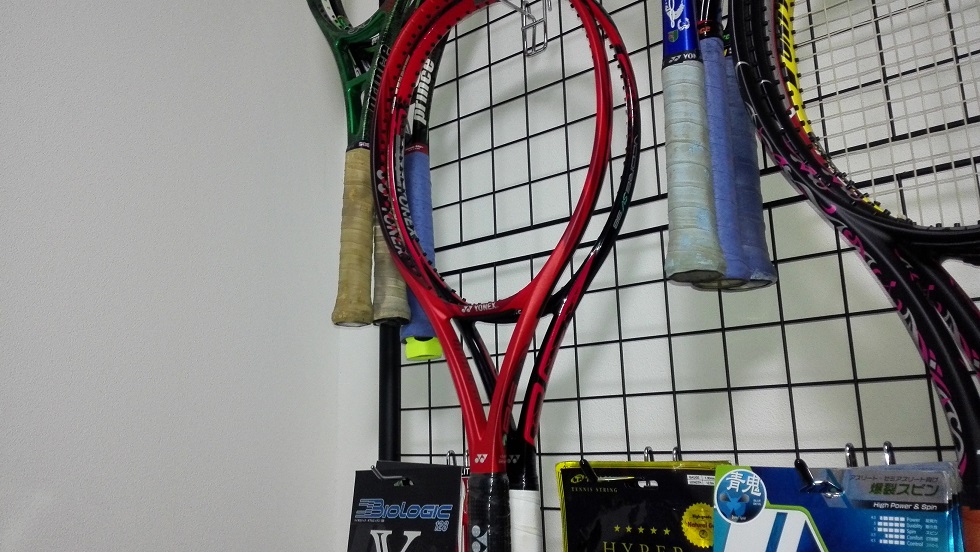
先生!急患です!
また先輩です!!!
自粛期間に耐えられずまた先輩がラケット買っちゃってました!
という事でVコア2本。
んん?どうして新旧まぜこぜをわざわざ持ってくるんですかね~~~~
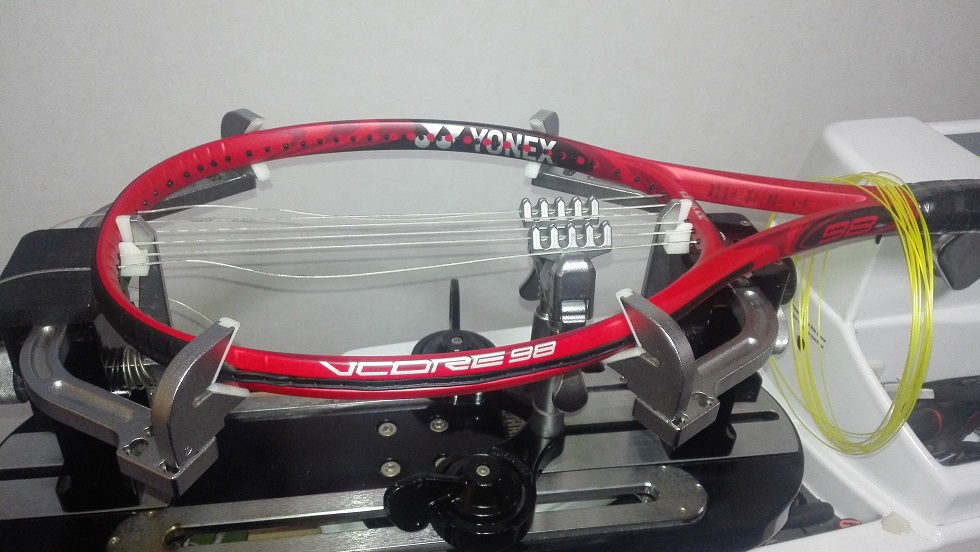
んんんんん~?
ストリングホールが何だかぁぁぁ???
エアロフィンって現行でもトップ部にこんなに広く配置されてるんでしたっけ~~~現行だとエアロトレンチでしたっけ~?
妙だな・・・(笑)
という訳で片方は市販品、片方はいつものいわくつき(笑)
2本ともメインVSチーム、クロスGツアー3でストリンギング。
先輩は昔はヨネックス一筋だったので相性は良いはず、今度プレー見せてくださいよ~いつになるのか(爆)
でも個人的にVコアシリーズで好きだったのはVコアツアー・・・正面厚が薄くなるエアロフィンはちょっと・・・なんちゃって・・・
かと言って薄さ的には近い生き残った現行品のVコアプロの前の前の(中略)ツアーGも粘りっ気が強くて難しいラケットだったな・・・
ヨネックスはRDS001も駄目だった・・・鈍くて飛ばなくて・・・あと四角かったVコアも鈍かった・・・自分にはあまり得意な印象ではないのだ・・・
このVコアももうちょっと薄く、何ならツアー系復活しないかなぁ、なんちゃって。
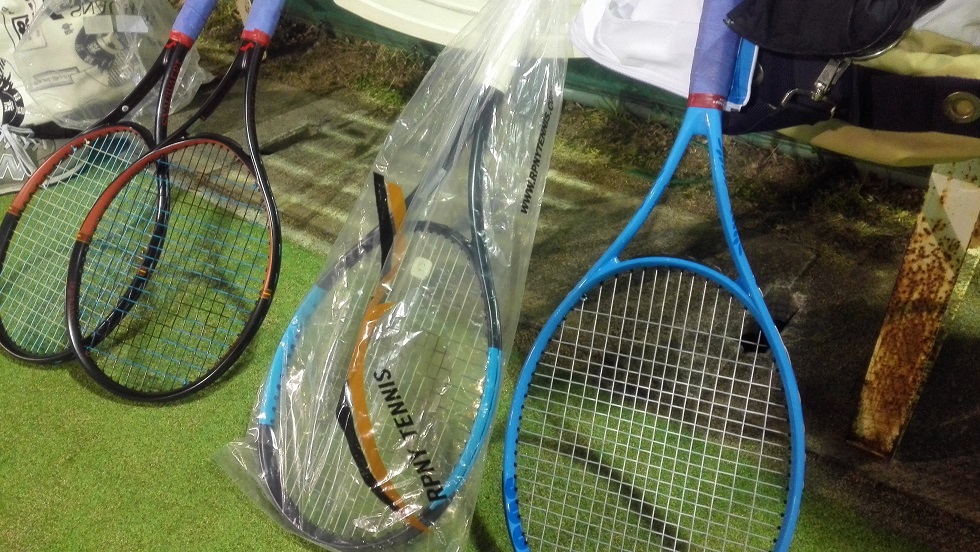
プロストックと言えば結構前の話ですが、これまた先輩のラケット。
一本は明らかにキプロスの英雄ですが、もう1本目もこれまた珍しいやつ?
Hじゃないやつ。
ラウンド形状・・・ちょっとしか打ってないけど、まあこれも雑味の無い良い弾き感。
フレームの強度?もありそう。
自分のセッティングじゃないから何とも言えないけど飛びは・・・何となくバグダディスさんの方がありそうなイメージ、けどどっちもとりあえず打ち易い。
個人的な好みはボックスだけど(今はグリンタだけど)、プロストックのラウンド系を自分仕様にしたらめっちゃ気に入っちゃったりするのかなぁ。












Take a chance in exciting online games on [url=https://puma-777.com/]puma777 slot[/url] and experience thrilling entertainment filled with excitement and fun. Individuals looking for a flexible yet secure option will find Puma777 especially attractive.
폰테크
휴대폰테크란 모바일 기기를 통해 유동 자금을 만드는 공식적인 자금 조달 방법입니다. 일반적인 소비 목적의 휴대폰 사용과는 달리 통신사와 유통 구조, 매입 시스템을 활용하여 실질적인 자금 확보가 가능한 방식이며, 절차가 비교적 단순하고 접근성이 높다는 특징이 있습니다. 신용 문제로 금융권 이용이 어렵거나 단기간 자금이 필요한 경우에 대안적인 방법으로 활용되는 경우가 많습니다.
이 방식의 구조는 이해하기 어렵지 않습니다. 먼저 통신사를 통해 스마트폰을 정상적으로 개통한 뒤, 해당 단말기를 매입 업체를 통해 처분합니다. 가격은 모델과 시장 시세, 조건에 따라 달라지며, 판매 대금은 현금 또는 계좌이체로 지급됩니다. 이후 휴대폰 할부금과 통신요금은 본인이 정상적으로 납부해야 하며, 이 부분에 대한 관리가 매우 중요합니다. 이는 불법 대출과는 다른 구조로, 휴대폰을 하나의 자산처럼 활용하는 방식이라고 볼 수 있습니다.
폰테크는 일반적인 은행 대출과 비교했을 때 뚜렷한 차이가 있습니다. 복잡한 심사나 서류 절차가 거의 없고, 단시간 내 자금 마련이 가능하다는 점이 대표적인 장점입니다. 또한 대출 기록이 남지 않는 구조이기 때문에 기존 금융 기록이 부담되는 상황에서도 활용할 수 있습니다. 하지만 통신요금 미납이나 연체가 발생할 경우 신용도에 영향을 줄 수 있으므로 책임 있는 이용이 필수적입니다.
사람들이 폰테크를 선택하는 이유는 다양합니다. 급전이 필요한 상황이나 금융 이용이 제한된 경우, 자금 흐름이 필요한 상황 등 다양한 상황에서 고려됩니다. 특히 빠른 자금 유동성이 필요한 경우 현실적인 대안으로 선택되는 경우가 많습니다.
확보한 현금은 주식이나 코인 투자, 사업 자금, 생활비 등 다양한 용도로 사용되기도 합니다. 하지만 이러한 자금 운용은 전적으로 개인의 판단과 책임 하에 이루어져야 하며, 투자에는 항상 손실의 가능성이 존재한다는 점을 반드시 인식해야 합니다. 폰테크는 수익을 보장하는 수단이 아니라 자금 확보 목적의 수단이라는 점을 명확히 해야 합니다.
해당 방식은 합법적이지만 주의해야 할 부분도 분명히 존재합니다. 무리한 개통은 통신 정책상 문제가 될 수 있으며, 요금 납부 능력을 고려하지 않은 진행은 부담이 될 수 있습니다. 비정상적인 수익을 약속하거나 명의를 요구하는 경우는 주의해야 하며, 절차는 항상 합법적이고 투명하게 진행되어야 합니다.
결론적으로, 폰테크는 휴대폰과 통신 유통 구조를 활용한 합법적인 자금 조달 방법으로, 충분한 이해와 책임 있는 관리가 동반될 경우 현금 유동성 확보에 유용할 수 있습니다. 가장 중요한 것은 충분한 정보와 합리적인 결정입니다.
lightweight screenshot app
The Best Screenshot Utility for Windows 10 & 11
If screenshots are a regular part of your workflow, the standard Windows Snipping Tool soon shows its limitations. Multiple steps, no cloud support, no instant sharing links, and sluggish interaction make it impractical for modern workflows. A modern screenshot tool must stay out of the way, work fast, and focus on a single process: capture, then upload and share.
This lightweight screenshot tool for Windows 10 and 11 is designed precisely for this purpose. Press PrtScn, select a region on the screen, release, and the screenshot is instantly uploaded. A shareable link is automatically copied to the clipboard. No save dialogs, no browsing folders, no manual uploading.
Area capture works precisely and predictably. A clean crosshair selector allows pixel-accurate selection, which makes capturing UI elements, code snippets, charts, or partial screens effortless — more efficient and reliable than Windows Snipping Tool.
Full screen capture is just as simple. Use Shift + PrtScn to capture the entire desktop instantly. The result is a full-resolution image suitable for documentation, presentations, or bug reports, without delays or popups breaking the workflow.
The primary benefit is immediate cloud upload. All screenshots are uploaded automatically, and the sharing link available within milliseconds. The link can be pasted instantly into messengers, emails, or support systems without interacting with the file system or external image hosting services.
The tool works quietly from the system tray and remains out of your workflow. Memory consumption remains under 50MB of RAM, startup is instant, and the installer is only 2MB. Compared with heavier tools such as Greenshot, Lightshot, and ShareX, the difference in speed and responsiveness is immediately noticeable.
Privacy is handled correctly. No advertising, no analytics, no tracking, and no background data collection. Screenshots may contain sensitive information, and this tool treats them accordingly — nothing unnecessary runs behind the scenes.
Hotkeys can be fully customized. You can assign PrtScn, Ctrl+Shift+S, or any shortcut you want, and adjust image quality or behavior without bloated settings panels or cluttered menus.
The built-in Windows Snipping Tool works, but it stops at capture. It lacks cloud integration, instant sharing, and speed optimization. This tool replaces it by focusing on what actually matters: capturing data and sharing it without delay.
If screenshots are part of your daily work in development, support, remote work, or documentation — speed and simplicity are not optional. A proper screenshot tool should feel built into the system, not like a separate application.
[url=https://casino-fc777.com/]fc777 slot[/url] offers the best slot machines and generous bonuses for all players.
Initially, it is important to comprehend the core elements of fc777.
screen capture The Best Screenshot Utility for Windows 10 & 11 If screenshots are part of your daily workflow the default Windows Snipping Tool quickly becomes a limitation. Extra steps no cloud upload no instant links and slow interaction make it unsuitable for today’s workflows. A modern screenshot tool should be unobtrusive fast and designed around a single streamlined flow: capture upload share. This lightweight screenshot tool for Windows 10 and 11 is built specifically around this idea. Hit PrtScn choose any screen area release and the screenshot is uploaded immediately. The sharing link is placed in your clipboard automatically. No save dialogs no browsing folders no manual uploading. Region capture is precise and predictable. A simple crosshair selector enables pixel-level accuracy allowing easy capture of interface elements code fragments charts or partial screens — more efficient and reliable than Windows Snipping Tool. Capturing the entire screen is just as easy. Use Shift PrtScn to capture the entire desktop instantly. The result is a full-resolution image perfect for documentation presentations and bug reports without delays or popups interrupting the workflow. The key advantage is instant cloud upload. All screenshots are uploaded automatically with the link ready in milliseconds. The link can be pasted instantly into messengers emails or support systems without interacting with the file system or external image hosting services. The tool works quietly from the system tray and remains out of your workflow. Memory consumption remains under 50MB of RAM launch time is virtually instant and the installer is only 2MB. When compared to heavier alternatives like Greenshot Lightshot or ShareX the performance and responsiveness difference is obvious immediately. Privacy is handled responsibly. There are no ads no analytics no tracking and no background data collection. Screenshots often contain sensitive information and this tool handles them appropriately — and no unnecessary processes running behind the scenes. Hotkeys can be fully customized. You can assign PrtScn CtrlShiftS or any shortcut you want and adjust image quality or behavior without bloated settings panels or cluttered menus. Windows Snipping Tool functions but it stops after capture. It lacks cloud integration instant sharing and speed optimization. This tool replaces it by focusing on what actually matters: capturing data and sharing it without delay. If you take screenshots every day — for development support remote work or documentation — speed and simplicity are mandatory. A proper screenshot tool should feel built into the system not like a separate application.