

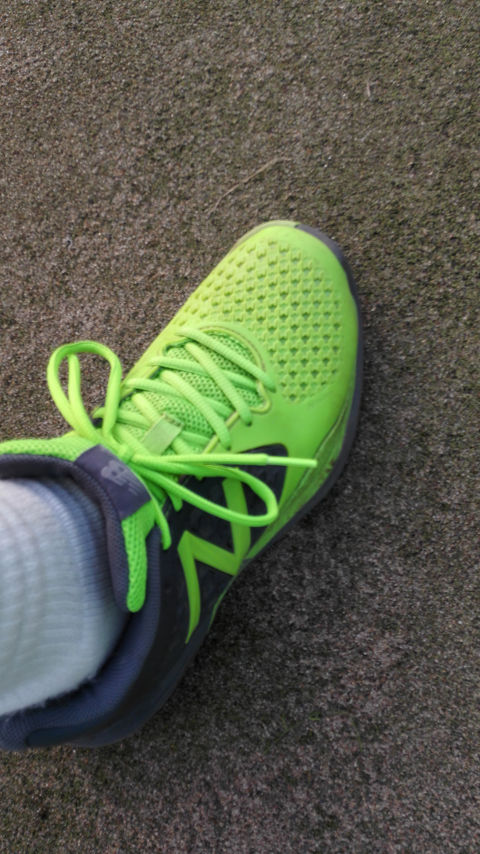
この前の草試合で課題見つかったのもあるけど、2時間3セットたっぷり動き回ったのもあって試合後は体中ボロボロでした。
身体への負担を減らすべく大4から軽めのシューズを意識、分厚いソロパッズにも手を出したのですが、カーフタイツを履くようになってからセットだと似合わないのでクルーサイズを敬遠していました。
しかしたった3セットでこんなに疲れてしまうならやはり彼の力が必要不可欠。
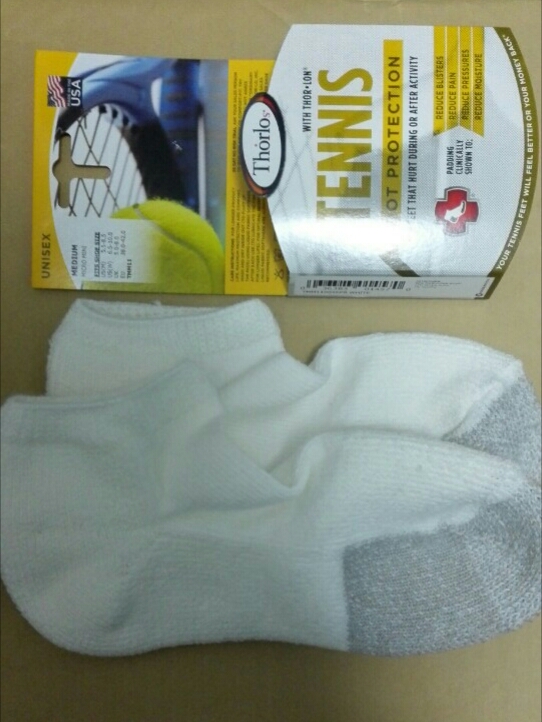
ナイターレッスンでマイクロクルー初投入してきました。
カーフタイツ×ソロパッズの強力コンビです。
久々のソロパッズはフカフカで気持ち良いです。
でも草試合は足に加えて腰も腕も疲れたなあ。
その内フルアーマーかなあ。
ザムストかミズノか、関口選手が契約したドロンも良いかもなあ。












rufus windows 11 Rufus is known as a lightweight no-cost open source utility built to make bootable USB drives. It is used to prepare a USB flash drive that can install an operating system launch diagnostic tools or boot into a recovery environment. The program does not require installation and can be launched immediately after downloading. The main purpose of Rufus is helping users to create bootable USB media from ISO images quickly and reliably. This allows users to install or run operating systems directly from a USB flash drive without the need for DVDs. The tool supports a wide range of operating systems and service utilities which makes it useful for both regular users and system administrators. Rufus works on computers with Microsoft Windows starting from Windows 7. Both 32-bit and 64-bit versions are supported and there is also a version available for ARM64 architecture. The software allows users to create bootable USB drives from many different ISO images. It can be used to prepare a USB drive for installing Windows 11 Windows 10 Windows 8.1 or Windows 7 as well as various Linux distributions. Rufus also works with DOS systems and other recovery or maintenance tools commonly used for troubleshooting computers. One of the integrated features of Rufus is the ability to download official Windows ISO images directly from Microsoft servers. This allows users to obtain original installation images for Windows 8.1 Windows 10 and Windows 11 without searching for them on third-party websites. In addition to creating bootable drives Rufus can format USB devices. It supports several file systems including FAT32 NTFS exFAT UDF and ReFS. This flexibility allows the USB drive to be prepared for different use cases and compatibility requirements. Rufus supports both legacy BIOS systems and modern UEFI environments. Because of this bootable drives created with Rufus can work on older computers as well as newer systems that use UEFI and Secure Boot. Another feature included in Rufus is Windows To Go support. This option allows users to run a full Windows environment directly from a USB drive. It can be useful for testing systems performing maintenance or working on multiple computers without installing Windows on the internal drive. Rufus also provides the option to bypass certain Windows 11 installation requirements. When creating an installation USB the program can disable checks for TPM 2.0 Secure Boot and minimum RAM requirements. This makes it possible to install Windows 11 on computers that would otherwise not meet the official hardware requirements. One of the reasons Rufus has become popular is its speed and simplicity. The program is extremely small about 1.9 MB in size and runs as a portable application without installation. It is distributed under the GPL v3 open-source license supports more than 70 languages and contains no advertisements bundled software or tracking components. Rufus works with a large number of ISO images. These include multiple versions of Windows Windows Server editions FreeDOS and various system tools such as GParted Hiren’s Boot CD Parted Magic and Clonezilla. Because of this wide compatibility the program can be used not only for installing operating systems but also for disk management data recovery and system maintenance tasks. To use Rufus a computer running Windows 7 or later and a USB flash drive are required. The program does not need to be installed. Users simply download the executable file run it select the ISO image they want to use and create a bootable USB drive. Due to its simplicity speed and reliability Rufus remains one of the most widely used tools for creating bootable USB drives.
ทดลองเล่นสล็อต pg ฟรี สล็อต PG สล็อตยอดฮิต เล่นง่าย ฝากถอนเร็ว คำค้นหา สล็อต PG กำลังได้รับความนิยมอย่างต่อเนื่อง ในกลุ่มผู้เล่นเกมสล็อตออนไลน์ เพราะเป็น แบรนด์เกมที่โดดเด่น ด้าน กราฟิก ความ เสถียร และ โอกาสรับกำไรที่ดี เกมของ PG พัฒนาโดยผู้ให้บริการชั้นนำ ที่รองรับการเล่นทั้งบน มือถือ และ พีซี จุดเด่น ของ สล็อต PG สล็อต PG เป็นเกมสล็อตออนไลน์ที่ออกแบบมาให้ เปิดเกมได้ทันที เล่นผ่าน ระบบเว็บ และรองรับ ทั้ง iOS และ Android ไม่ต้องติดตั้งเพิ่มเติม ผู้เล่นสามารถเข้าเล่นผ่าน Browser ได้ทันที ภาพและเสียงถูกพัฒนาในรูปแบบ 3D ให้ความคมชัด พร้อมเอฟเฟกต์ จัดเต็ม คุณสมบัติหลักของเกม สล็อต PG ได้แก่ โบนัสและฟรีสปินหลายแบบ ระบบตัวคูณ เล่นฟรีก่อนเติมเงิน รองรับภาษาไทยเต็มรูปแบบ ระบบฝากถอนสะดวก ทำรายการไว แพลตฟอร์ม สล็อต PG ส่วนใหญ่รองรับ การฝาก-ถอน ออโต้ตลอด 24 ชม. ขั้นต่ำเริ่มต้นเพียง 1 บาท ขึ้นอยู่กับ ระบบของผู้ให้บริการ การทำรายการใช้เวลา เพียงไม่กี่วินาที ผ่าน QR Code หรือระบบ ธนาคารบนมือถือ ทำให้ธุรกรรมเป็นไปอย่าง ต่อเนื่อง ประเภทเกมยอดนิยม ใน PG Slot เกม PG Slot มีธีมหลากหลาย เช่น ธีม แฟนตาซี ธีม Adventure ธีม ความมั่งคั่ง ธีม ธรรมชาติ ผู้เล่นนิยมเกมที่มีรอบพิเศษบ่อย พร้อมระบบ ฟีเจอร์พิเศษ และ อัตราการจ่ายที่สูง เหมาะกับทั้ง มือใหม่ และ ผู้เล่นมือโปร มาตรฐานระบบ สล็อต PG ใช้ระบบที่ได้มาตรฐาน มีการ รักษาความปลอดภัย และใช้ระบบสุ่มผล Random Number Generator เพื่อให้ผลลัพธ์ ตรวจสอบได้ แพลตฟอร์มที่ให้บริการ สล็อต PG ควรมี ความปลอดภัยสูง โดยภาพรวม pg slot เป็นตัวเลือกยอดนิยมสำหรับผู้ที่ต้องการเล่นสล็อตออนไลน์ ด้วยจุดเด่นด้าน โบนัสหลากหลาย และการทำธุรกรรมที่ ทันใจ ผู้เล่นสามารถเริ่มต้นได้ ทันที ฝากถอนสะดวก และเลือกเกมได้ หลากหลายแนว เหมาะสำหรับ ผู้เล่นทุกสไตล์ ในโลกของเกมสล็อตออนไลน์
ทดลองเล่นสล็อต pg PG Slot สล็อตยอดฮิต เข้าเล่นไว ฝากถอนออโต้ คำค้นหา pg slot กำลังได้รับความนิยมอย่างต่อเนื่อง ในกลุ่มผู้เล่นเกมสล็อตออนไลน์ เพราะเป็น ค่ายเกมที่มีชื่อเสียง ด้าน งานภาพคุณภาพสูง ความ ลื่นไหล และ อัตราการจ่ายรางวัลที่น่าสนใจ เกมของ PG พัฒนาโดยผู้ให้บริการชั้นนำ ที่รองรับการเล่นทั้งบน โทรศัพท์มือถือ และ เดสก์ท็อป ข้อดี ของ pg slot PG Slot เป็นเกมสล็อตออนไลน์ที่ออกแบบมาให้ เข้าเกมไว เล่นผ่าน ระบบอัตโนมัติ และรองรับ ทั้ง iOS และ Android เข้าเล่นผ่านเว็บได้เลย ผู้เล่นสามารถเข้าเล่นผ่าน Browser ได้ทันที ภาพและเสียงถูกพัฒนาในรูปแบบ สามมิติ ให้ความคมชัด พร้อมเอฟเฟกต์ สมจริง คุณสมบัติหลักของเกม PG Slot ได้แก่ ระบบโบนัสและฟรีสปินหลากหลายรูปแบบ Multiplier เดโม่ฟรี รองรับภาษาไทยเต็มรูปแบบ ระบบการเงินรวดเร็ว ไม่ต้องรอนาน แพลตฟอร์ม สล็อต PG ส่วนใหญ่รองรับ การฝาก-ถอน ออโต้ตลอด 24 ชม. ขั้นต่ำเริ่มต้นเพียง หลักหน่วย ขึ้นอยู่กับ เงื่อนไขของเว็บไซต์ การทำรายการใช้เวลา รวดเร็วมาก ผ่าน QR Code หรือระบบ ธนาคารบนมือถือ ทำให้ธุรกรรมเป็นไปอย่าง ลื่นไหล แนวเกมที่คนเล่นเยอะ ใน pg slot เกม สล็อต PG มีธีมหลากหลาย เช่น ธีม เทพเจ้าและแฟนตาซี ธีม ลุยด่าน ธีม ความมั่งคั่ง ธีม สัตว์และธรรมชาติ หลายคนชอบเกมที่โบนัสเข้าไว พร้อมระบบ ฟีเจอร์พิเศษ และ อัตราการจ่ายที่สูง เหมาะกับทั้ง ผู้เล่นเริ่มต้น และ ผู้เล่นที่มีประสบการณ์ ความปลอดภัย สล็อต PG พัฒนาในระบบสากล มีการ เข้ารหัสข้อมูล และใช้ระบบสุ่มผล Random Number Generator เพื่อให้ผลลัพธ์ โปร่งใส แพลตฟอร์มที่ให้บริการ pg slot ควรมี ระบบดูแลข้อมูล โดยภาพรวม PG Slot เป็นตัวเลือกยอดนิยมสำหรับผู้ที่ต้องการเล่นสล็อตออนไลน์ ด้วยจุดเด่นด้าน กราฟิกคุณภาพ และการทำธุรกรรมที่ ไว ผู้เล่นสามารถเริ่มต้นได้ ง่าย ฝากถอนสะดวก และเลือกเกมได้ ครบทุกหมวด เหมาะสำหรับ ทุกระดับประสบการณ์ ในโลกของเกมสล็อตออนไลน์ https://medium.com/ratypw/ทดลองเล่นสล็อต-pg-70cdb1132344
Автозайм Займ с обеспечением ПТС в городе Самара — представляет собой вариант получить финансирование под машину без продажи транспорта и без долгих банковских процедур. Ключевая особенность автозайма — транспорт остаётся у владельца у собственника а в залог оформляется только ПТС. Это позволяет использовать транспортом пока действует срок договора. Получение денег возможна в день обращения. Обращение рассматривается примерно за 15 мин затем принимается решение по сумме и условиям. Размер финансирования может составлять до 5 000 000 ? а ставка стартует от 2 в месяц. Период займа как правило составляет до 60 мес. по этой причине заёмщик может подобрать подходящий план платежей. Система оформления заявки доступна через интернет. Заёмщик заполняет онлайн-форму вносит данные автомобиля и желаемую сумму. После проверки документов выносится предварительное решение. В большинстве случаев средства выдаются в день оформления после подписания договор займа. Для оценки параметров применяется калькулятор займа. К примеру если взять 300 000 ? на период 12 месяцев платёж в месяц составит около 33 057 ?. Итоговая сумма переплаты по такому займу составит около 96 684 ?. Конечные параметры могут отличаться в зависимости стоимости автомобиля и установленного срока займа. На страницах сервиса автозаймов нередко отображается лента заявок. Этот блок показывает активность сервиса и примеры одобренных заявок по разным городам. К примеру заявки на сумму 1 840 000 ? город Тула 1 890 000 ? из Москвы или 1 470 000 ? город Челябинск получают метку «Одобрено». Часть обращений находятся на этапе проверки — например 290 000 ? город Сочи или 720 000 ? из Екатеринбурга. Подобные разделы показывают текущую активность сервиса и количество обработанных заявок за день и за месяц. Займ под залог ПТС подходит тем кому требуется быстро получить значительную сумму без продажи автомобиля. Базовые параметры подобного финансирования — ставка от 2 в месяц одобрение примерно 15 минут сумма до 5 млн ? и вариант оформить заявку через интернет. После отправки формы заёмщик может дождаться решения написать в мессенджер или обратиться к менеджеру для уточнения деталей оформления.
rufus windows 11 Rufus remains a compact free open-source utility designed to make bootable USB drives. It helps users prepare a USB flash drive that can install an operating system launch diagnostic tools or boot into a recovery environment. The program works without installation and can be run as soon as it is downloaded. The main function of Rufus is to create bootable USB media from ISO images quickly and reliably. This allows users to install or run operating systems directly from a USB flash drive without the need for DVDs. The tool works with a large number of operating systems and service utilities which makes it practical for both regular users and system administrators. Rufus runs on computers with Microsoft Windows starting from Windows 7. Both 32-bit and 64-bit versions are supported and there is also a version available for ARM64 architecture. The software lets users create bootable USB drives from many different ISO images. It can be used to prepare a USB drive for installing Windows 11 Windows 10 Windows 8.1 or Windows 7 as well as various Linux distributions. Rufus also works with DOS systems and other recovery or maintenance tools commonly used for troubleshooting computers. One of the integrated features of Rufus is the ability to download official Windows ISO images directly from Microsoft servers. This allows users to obtain original installation images for Windows 8.1 Windows 10 and Windows 11 without searching for them on third-party websites. In addition to creating bootable drives Rufus can format USB devices. It supports several file systems including FAT32 NTFS exFAT UDF and ReFS. This flexibility allows the USB drive to be prepared for different use cases and compatibility requirements. Rufus supports both legacy BIOS systems and modern UEFI environments. Because of this bootable drives created with Rufus can work on older computers as well as newer systems that use UEFI and Secure Boot. Another feature included in Rufus is Windows To Go support. This option allows users to run a full Windows environment directly from a USB drive. It can be useful for testing systems performing maintenance or working on multiple computers without installing Windows on the internal drive. Rufus also provides the option to bypass certain Windows 11 installation requirements. When creating an installation USB the program can disable checks for TPM 2.0 Secure Boot and minimum RAM requirements. This makes it possible to install Windows 11 on computers that would otherwise not meet the official hardware requirements. One of the reasons Rufus has become popular is its speed and simplicity. The program is extremely small about 1.9 MB in size and runs as a portable application without installation. It is distributed under the GPL v3 open-source license supports more than 70 languages and contains no advertisements bundled software or tracking components. Rufus works with a large number of ISO images. These include multiple versions of Windows Windows Server editions FreeDOS and various system tools such as GParted Hiren’s Boot CD Parted Magic and Clonezilla. Because of this wide compatibility the program can be used not only for installing operating systems but also for disk management data recovery and system maintenance tasks. To use Rufus a computer running Windows 7 or later and a USB flash drive are required. The program does not need to be installed. Users simply download the executable file run it select the ISO image they want to use and create a bootable USB drive. Due to its simplicity speed and reliability Rufus remains one of the most widely used tools for creating bootable USB drives.